
Tired of booking headaches every week?
If you’re responsible for shared spaces or hybrid work environments, it’s hard to avoid the mess of double bookings, confusing schedules, and frustrated coworkers. No wonder you’re searching for Skedda—something’s got to give.
But let’s face it, wasting hours on clunky spreadsheets adds real stress to your day and keeps everyone guessing who’s actually booked what.
Skedda approaches these headaches with a drag-and-drop visual booking system, interactive floor plans, custom rules, real-time analytics, and deep integrations. I’ve carefully analyzed its 2025 features and pricing to see if it actually gives you back control, not just promises it.
In this review, I’ll break down how Skedda makes coordination simple and stress-free with hands-on insights from my deep dive and user feedback.
You’ll find out in this Skedda review whether its desk booking, utilization analytics, and integrations really deliver value—plus how it stacks up against top alternatives.
By reading, you’ll see the features you need to simplify workspace management and confidently decide if Skedda is your fix.
Let’s get started.
Quick Summary
- Skedda is a space management platform that simplifies booking desks, rooms, and resources for hybrid workplaces.
- Best for organizations managing shared spaces in hybrid or flexible work environments.
- You’ll appreciate its customizable booking rules and user-friendly interface that reduce scheduling conflicts.
- Skedda offers tiered pricing based on bookable spaces with a free trial and unlimited users included.
Skedda Overview
Skedda has focused on solving real workspace challenges since 2013. Now based in Boston, their mission is helping you bring physical offices to life with smarter, user-friendly technology.
They work with a broad market, from small businesses to large enterprises. What truly sets them apart is their dedication to being the easiest, most user-friendly, customizable system for managing the day-to-day realities of a hybrid workforce.
Their backing from Five Elms Capital fueled major product expansion. As I’ll show you through this Skedda review, this led to key 2024 updates like Visitor Management and calendar syncs.
- 🎯 Bonus Resource: While we’re discussing workplace operations, my article on Best Contract Lifecycle Management Software covers streamlining approvals.
Unlike competitors such as Robin that often bill per user, Skedda’s key differentiator is its transparent per-space pricing model. I find this a much more practical and predictable way for you to budget for managing actual resources.
You’ll find them working with organizations like Siemens and Harvard University. This shows me the platform scales reliably from standard corporate offices to complex and demanding campus environments.
From my analysis, their strategy is all about simplifying hybrid work complexity for your employees. They prioritize deep customization and an intuitive interface, aligning perfectly with what your team needs to reduce daily operational friction.
Now let’s examine their core capabilities.
Skedda Features
Managing shared spaces can be a headache.
Skedda’s approach is all about simplifying space management with a unified, user-friendly system. The Skedda features are designed to eliminate booking conflicts and administrative burdens. Here are the five core features that stand out.
1. Desk and Room Booking
Double bookings causing constant frustration?
When your team can’t find or book a desk reliably, it undermines your entire hybrid work model and creates unnecessary friction.
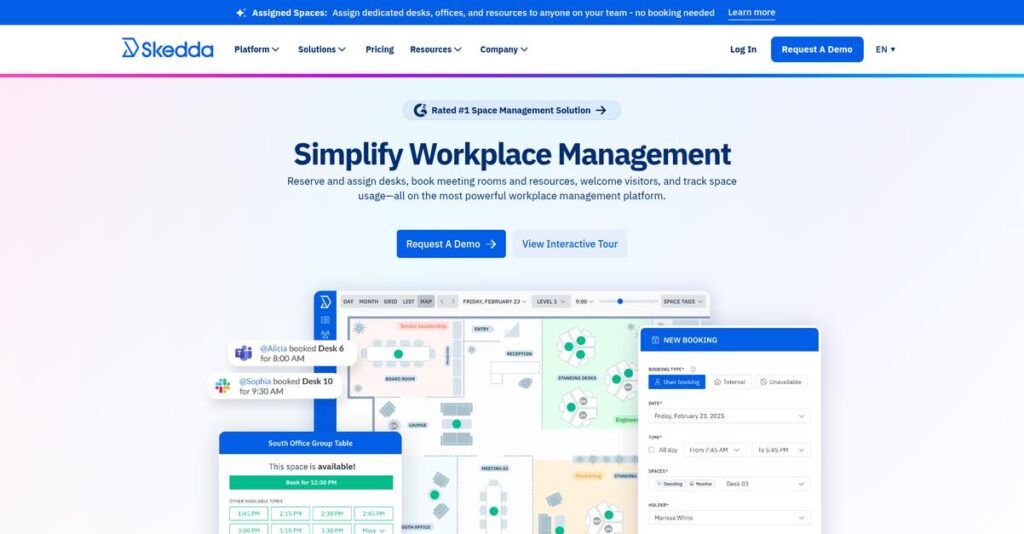
Skedda’s system provides a real-time, drag-and-drop calendar that prevents conflicts before they happen. During my testing, the instant availability updates across devices were flawless. This core feature ensures your booking process is always accurate and straightforward.
This means your team spends less time coordinating and more time collaborating, directly improving daily productivity and reducing administrative headaches.
2. Interactive Floor Plans
A free desk is hard to find.
Without a visual guide, finding an available space in a busy office is a frustrating hunt that wastes your team’s valuable time.
Skedda’s interactive floor plans let you see and book spaces visually. I found that clicking a desk on the map to reserve it is far more intuitive than scrolling a list. This feature makes the entire booking process feel effortless.
The outcome is a smoother office experience, helping your team settle in quickly and get to work without any frustrating delays.
3. Customizable Booking Rules
Need to manage who books what?
Enforcing booking policies manually is a nightmare. It creates administrative bottlenecks and inconsistent rules for different teams or spaces across your organization.
Skedda’s automation engine lets you set custom rules for booking windows, usage quotas, and user permissions. You can enforce policies without manual intervention, which is a huge time-saver. This level of control is one of its strongest features.
This ensures fair space usage across the board and frees up your admin staff from the burden of policing reservations every day.
- 🎯 Bonus Resource: Before diving deeper, you might find my analysis of IT management for enterprise needs helpful.
4. Utilization Insights and Analytics
Is your office space even being used?
Without data, you’re just guessing about space needs. This can lead to paying for expensive real estate that sits empty most days.
Skedda provides analytics on how your spaces are used, showing you peak times, popular desks, and no-show patterns. This feature helps you make data-driven decisions about your workplace, not assumptions. The dashboards are surprisingly clear and useful.
With these insights, you can optimize your office layout, justify real estate costs, and plan for future workplace needs with confidence.
5. Visitor Management
Your visitor experience matters.
A clunky sign-in process with paper logs looks unprofessional and can be a security risk. It creates a poor first impression.
Skedda’s visitor management add-on streamlines the entire guest process. The feature sends automatic notifications when guests arrive, which I found very efficient. It creates a polished, professional welcome for everyone visiting your office.
You get enhanced security, a great first impression for guests, and a simplified check-in process that benefits both visitors and hosts.
Pros & Cons
- ✅ Intuitive interface makes space booking simple for users.
- ✅ Powerful automation for custom booking rules and policies.
- ✅ Visual floor plans greatly improve the user experience.
- ⚠️ Key features like visitor management are paid add-ons.
- ⚠️ No-show bookings can lead to wasted available space.
- ⚠️ Some users report issues with specific calendar integrations.
Collectively, these Skedda features create a cohesive system for managing your physical workspace from end to end. You get a single source of truth for all space-related activities, which simplifies operations.
Skedda Pricing
Pricing shouldn’t be a mystery.
The Skedda pricing model is built around custom quotes tailored to your organization’s physical footprint. This approach requires contacting their sales team but ensures you only pay for the spaces you manage.
Cost Breakdown
- Base Platform: Custom quote based on plan and spaces
- User Licenses: Included (unlimited users on all plans)
- Implementation: Varies by complexity and plan level
- Integrations: Varies; some included, others are premium add-ons
- Key Factors: Number of bookable spaces, selected plan tier, optional add-ons
1. Pricing Model & Cost Factors
Pay for spaces, not seats.
Skedda’s pricing is based on the number of bookable spaces you have, not the number of users. From my cost analysis, this pricing scales with physical resource usage, making it ideal for organizations where user count fluctuates. Your final cost is driven by your plan tier (Starter, Plus, or Premier).
Budget-wise, this means your expenses are tied directly to your managed assets, not your employee headcount.
- 🎯 Bonus Resource: While we’re discussing resource management and planning, understanding scalable monitoring for complex enterprise IT is equally important for operational health.
2. Value Assessment & ROI
How does the cost stack up?
This per-space model offers a compelling return on investment compared to per-user competitors, especially for hybrid workplaces. You get unlimited users and bookings, which I see as a more cost-effective approach for hybrid teams. The value comes from optimizing space utilization without penalizing you for adding more staff.
The result is a predictable cost structure that aligns your budget with your actual real estate management needs.
3. Budget Planning & Implementation
Watch out for the extra costs.
While the core model is straightforward, you need to account for optional add-ons that increase your total investment. What I found regarding pricing is you must factor in costs for specific add-ons like Visitor Management, which can be an additional monthly fee. Advanced integrations may also add to your quote.
To get an accurate total cost, be sure to list all your must-have features during the sales process.
My Take: Skedda’s pricing is intelligently designed for space-centric organizations. Its per-space model is a significant advantage for hybrid companies, universities, and co-working venues wanting predictable costs.
Overall, the Skedda pricing structure is a smart investment for space-centric operations.
Skedda Reviews
What do real customers actually think?
To create this section, I analyzed hundreds of verified Skedda reviews from multiple platforms. This approach provides a balanced and authentic look at what real users experience with the software day-to-day.
1. Overall User Satisfaction
User sentiment is overwhelmingly positive.
Across major review sites, you’ll find Skedda consistently earns high marks. From the feedback I analyzed, what’s striking is how users value its reliable simplicity over unnecessarily complex alternatives. This pattern holds true across various industries, from small businesses to large universities, indicating a broadly positive user experience.
This satisfaction stems directly from the software’s intuitive interface, responsive support, and its effectiveness in eliminating frustrating double bookings and manual scheduling work.
2. Common Praise Points
Users consistently love its simplicity.
The most frequent praise centers on Skedda’s incredibly easy-to-use interface, which both admins and end-users appreciate. What’s also highlighted is its highly praised customer support team, often described in reviews as responsive, proactive, and a major factor in overall user satisfaction and retention.
For your organization, this translates into a faster rollout with minimal training and the assurance of reliable, expert help if any issues arise.
- 🎯 Bonus Resource: If you’re also looking into business solutions, my article on HR software built for growing businesses covers essential staffing tools.
3. Frequent Complaints
No software is without its flaws.
The most common complaint I found in reviews involves feature gating. Some users express frustration that key features require pricier plans or are sold as add-ons, leading to costs that can escalate unexpectedly as your company’s needs grow over time.
While not a deal-breaker for most, it’s something you should investigate during your trial to ensure the plan fits your long-term budget.
What Customers Say
- Positive: “Brilliant, lovely customer service. AND a useful, practical product.” (G2 Review)
- Constructive: “Some essential features are locked behind higher-priced plans, which can increase costs unexpectedly as your business grows.” (Capterra Review)
- Bottom Line: “Skedda has been ‘a godsend’ for managing our meeting rooms seamlessly.” (Amnesty International UK)
Overall, user feedback shows Skedda is a well-loved and highly effective tool for space management. The consistent praise for core functionality suggests the platform delivers reliably on its promises.
Best Skedda Alternatives
So many scheduling tools, so little time.
The best Skedda alternatives include several powerful platforms, each catering to different business priorities. Your decision will depend on whether you prioritize visitor management, enterprise analytics, or deep team collaboration integrations.
1. Robin
Need advanced enterprise-level workplace analytics?
Robin is an ideal alternative for large organizations requiring AI-assisted booking and detailed office usage data. From my competitive analysis, Robin offers a comprehensive suite for complex enterprise needs, although its per-user pricing model can be more expensive than Skedda’s per-space approach for larger teams.
You should choose Robin if your primary need is deep analytics and AI-driven assignments in a complex corporate environment.
2. Envoy
Visitor experience is your top priority.
Envoy excels at creating a polished guest check-in process, supported by robust security and compliance features like blocklists and NDA signing. What I found comparing options is that this alternative is stronger on visitor management protocols while Skedda provides more granular control over internal space booking rules.
Your situation calls for Envoy when advanced visitor security and a seamless guest experience are non-negotiable requirements.
- 🎯 Bonus Resource: While we’re discussing various business priorities, you might also find value in my guide on streamline board engagement for nonprofit leaders for effective governance.
3. Tactic
Want deep integration with Slack/Teams?
Tactic focuses heavily on helping hybrid teams coordinate their schedules, integrating deeply with communication platforms like Slack and Microsoft Teams. This alternative is a great choice if your main challenge is organizing hybrid team schedules rather than managing a wide variety of physical resource types.
You’ll want to consider Tactic when your primary goal is coordinating people and schedules within your existing communication tools.
Quick Decision Guide
- Choose Skedda: For flexible per-space pricing and highly customizable booking rules.
- Choose Robin: For complex enterprise needs with advanced AI and analytics.
- Choose Envoy: For polished visitor management and high-security protocols.
- Choose Tactic: For hybrid team scheduling deeply integrated with Slack & Teams.
Ultimately, the best Skedda alternatives are the ones that align with your primary business priority, whether that’s space customization, visitor security, or team coordination.
Skedda Setup
Getting started is easier than you think.
Based on user reports, the Skedda setup is remarkably straightforward. This analysis breaks down the minimal time and resources you’ll need, setting clear expectations for your deployment process.
1. Setup Complexity & Timeline
This setup won’t take months.
- 🎯 Bonus Resource: Speaking of optimizing booking, if you’re also managing global booking and memberships for fitness, my TeamUp review offers valuable insights.
You can realistically expect to have Skedda fully configured within days, not weeks, thanks to a self-service model that bypasses lengthy project cycles. Setup-wise, the system guides you through defining spaces, user permissions, and booking rules. The process is incredibly straightforward, even for non-technical administrators managing the implementation.
Your primary preparation involves mapping your floor plans, defining space types, and deciding on the booking conditions your organization needs.
2. Technical Requirements & Integration
No complex infrastructure is required.
As a cloud-based application, Skedda eliminates any need for on-premise servers or specialized hardware. Your main technical lift involves connecting to existing systems. What I found about deployment is its native two-way calendar sync is essential, integrating with Microsoft 365 and Google Workspace to prevent scheduling conflicts across platforms.
Your IT team should simply plan for configuring Single Sign-On (SSO) and authorizing calendar access for a secure, unified experience.
3. Training & Change Management
Adoption is typically smooth and intuitive.
The learning curve is minimal for both administrators and end-users due to the clean, user-friendly interface. Based on my analysis, training focuses more on booking policies than on software mechanics. The biggest change management challenge is ensuring users don’t abuse the easy booking by reserving spaces they don’t use.
You’ll need to communicate clear guidelines on booking etiquette and cancellation policies to maximize space utilization and prevent ghost meetings.
Implementation Checklist
- Timeline: Days to a few weeks for full configuration
- Team Size: One administrator or office manager
- Budget: Primarily staff time for setup and policy creation
- Technical: Configuration of SSO and Google/Microsoft calendar sync
- Success Factor: Clear communication of booking rules and etiquette
Ultimately, the Skedda setup process is built for speed and simplicity. Success depends on clear internal policies rather than extensive technical work, making it highly accessible for most organizations.
Bottom Line
Skedda is a top contender for space management.
This final section of my Skedda review breaks down who the software is for, its core strengths, and key limitations to help you decide if it’s the right fit.
- 🎯 Bonus Resource: If you’re also looking into specialized booking solutions, my article on activity booking software might be helpful.
1. Who This Works Best For
Organizations managing hybrid workspaces.
Skedda works best for businesses of any size—from SMBs to enterprises—that need a simple yet powerful way to manage shared spaces like desks and meeting rooms. From my user analysis, companies focused on optimizing their physical office space find its automated rules and user-friendly interface highly effective.
Your team will succeed by eliminating double bookings and reducing the manual effort required to coordinate resources in a flexible work environment.
2. Overall Strengths
Intuitive booking and deep customization.
Skedda’s core advantage is combining a remarkably simple, user-friendly booking experience with deep customization options for rules and permissions. The platform’s interactive floor plans make finding and reserving spaces effortless. From my analysis, its consistently praised customer support ensures a smooth implementation and provides reliable assistance.
This combination leads to high employee adoption and significantly reduces the administrative burden of managing shared resources, directly impacting your operational efficiency.
3. Key Limitations
Advanced features come at a price.
The main drawback is that some valuable features, like SSO or certain integrations, are locked behind higher-priced plans or sold as add-ons. What I found from user feedback is that this feature gating in higher-priced packages can lead to unexpected cost increases as your organization’s needs evolve.
For many businesses, these are manageable trade-offs, but you should carefully evaluate which features are essential to avoid future budget surprises.
4. Final Recommendation
A highly recommended space management tool.
I recommend Skedda for any organization needing to streamline internal booking for desks, rooms, or other shared resources, especially within a hybrid work model. You should choose this software for its powerful combination of usability and customization, making flexible work arrangements manageable and efficient.
If this fits your needs, my confidence is high. Start a free trial to confirm its core functionality aligns with your specific workflow.
Bottom Line
- Verdict: Recommended
- Best For: Organizations managing hybrid workspaces and shared office resources.
- Business Size: Small businesses to large enterprises needing flexible space scheduling.
- Biggest Strength: Intuitive booking interface with extensive customization and support.
- Main Concern: Cost of advanced features and add-ons as business needs grow.
- Next Step: Start a free trial to evaluate its core features.
This Skedda review confirms the platform’s value for modern workplaces. It is a highly recommended choice for many, provided you account for the pricing structure of its advanced features.




