
Contract chaos slowing down your legal team?
If you’re considering LinkSquares, you’re probably overwhelmed by slow contract reviews, risky manual data entry, and endless back-and-forth just to find the right clause.
Here’s the reality: wasted hours digging for key contract terms is killing productivity and letting revenue slip through the cracks every day.
That’s where LinkSquares stands out—bringing powerful AI to contract management so you can find, analyze, and draft agreements at speed, all from a single platform built for serious legal complexity.
In this review, I’ll walk you through how LinkSquares’s end-to-end AI solution truly delivers on making workflow and contract insights dramatically faster and more reliable.
You’ll see core features in action, real pricing insights, honest experiences with implementation, and how LinkSquares stacks up against other contract management systems in this LinkSquares review.
Get the features you need to cut contract cycle times and avoid the headaches of missing data or deadlines.
Let’s dive into the analysis.
Quick Summary
- LinkSquares is an AI-powered contract lifecycle management platform that automates contract drafting, execution, and analysis to improve efficiency and reduce risk.
- Best for mid-market to enterprise legal teams seeking end-to-end contract visibility and actionable insights.
- You’ll appreciate its accurate AI-powered data extraction and intuitive interface that simplify contract management and speed up review cycles.
- LinkSquares offers customized enterprise pricing with demos available but requires direct contact for quotes and no public pricing tiers.
LinkSquares Overview
Based in Boston since 2015, LinkSquares is on a mission to fix contract management for legal teams using its powerful, proprietary artificial intelligence.
What I find compelling is how they specifically target in-house legal and finance teams in mid-market to enterprise companies, especially within sectors like technology and life sciences. They aren’t trying to be a generic tool for everyone; this practical specialization is their greatest strength and you can feel it in the product’s design.
Their consistent recognition as a G2 Leader shows the platform genuinely resonates with users, a point I’ll explore more through this LinkSquares review.
Unlike competitors using third-party AI, LinkSquares’ key advantage is its purpose-built AI trained on legal data, not generic web text. I find this translates into much higher accuracy and relevance for your actual work, which is a major confidence booster for any legal team.
They work with hundreds of leading brands, from startups scaling quickly to established public companies like Wayfair, that need to reliably manage thousands of high-stakes agreements.
From my analysis, their strategy centers on practical AI that delivers immediate, tangible value. This focus on rapid ROI is critical if you want to modernize operations without getting stuck in a painful, multi-year implementation project.
Now let’s examine their core capabilities.
LinkSquares Features
Contract management can feel like chaos.
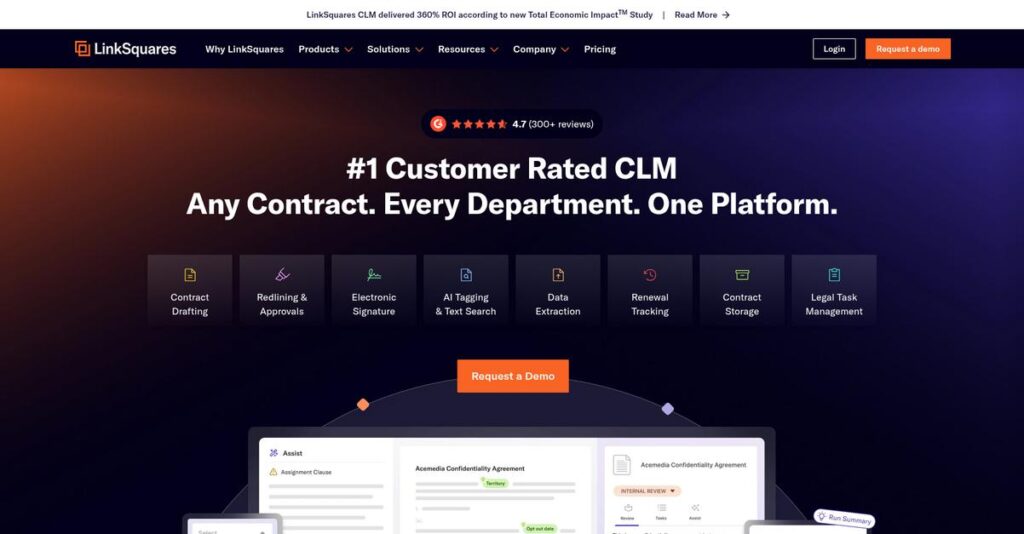
The LinkSquares features are designed to create an end-to-end contract lifecycle management (CLM) platform powered by proprietary AI. These are the five core LinkSquares solutions that bring order to your agreements.
1. LinkSquares Analyze
Lost in your executed contracts?
Your signed agreements sit in static folders, making it impossible to find key dates, risks, or obligations without manually reading every single document.
Analyze turns your repository into a searchable database. Its AI automatically extracts over 120 data points, like renewal dates and liability clauses. From my testing, the speed of portfolio-wide search is genuinely impressive for due diligence or reporting tasks.
This means you can answer critical business questions in seconds, track obligations proactively, and easily identify hidden risks across your entire contract portfolio.
2. LinkSquares Finalize
Pre-signature bottlenecks are slowing you down.
Endless email chains for approvals and inconsistent language from outdated templates create huge delays and increase your legal risk before a contract is even signed.
Finalize streamlines drafting with a clause library and automated approval workflows. What I love is its generative AI suggests redlines and clause language directly in Microsoft Word, a major time-saver for any legal team. This feature is a game-changer.
The result is you accelerate your deal cycles, ensure contractual consistency, and empower business users with secure, self-service drafting capabilities for faster turnarounds.
3. LinkSquares Sign
Jumping between tools to get signatures?
Using a separate e-signature tool breaks your workflow, forcing you to download, upload, and track documents manually, which introduces risk and wastes valuable time.
LinkSquares Sign is a native e-signature solution built right into the platform. This means execution happens in one seamless workflow, maintaining a complete, auditable trail from draft to signature without ever leaving the system. This integration is where it shines.
Your team gets to close deals faster with a secure, compliant, and fully integrated signing process that eliminates all that frustrating administrative busywork.
4. LinkAI
Generic AI just doesn’t get contracts.
Many AI tools are trained on general web data, failing to grasp the specific terminology and structure of legal agreements, leading to inaccurate data extraction.
LinkAI is purpose-built for legal, trained on millions of real contracts. This is where LinkSquares gets it right. Its models provide highly accurate metadata extraction and even flag risky terms automatically across your entire contract repository with impressive precision.
This means you can trust the data you’re getting, make smarter decisions faster, and proactively manage risk with an AI that actually speaks legal.
5. Prioritize
Is legal work a black box?
- 🎯 Bonus Resource: If you’re also looking into other business solutions, my article on marketplace launch solutions covers how to realize your marketplace launch in under 90 days.
Your legal team handles tons of requests beyond just contracts, but tracking that work in spreadsheets makes it impossible to manage workloads or show value.
Prioritize is a legal project management tool that helps you manage all legal initiatives. You can turn requests into trackable tasks, assign work, and build reports that quantify the team’s impact. This solution provides much-needed organizational visibility.
You get a clear, data-backed view of your team’s workload and value, helping you justify resources and improve your overall operational efficiency.
Pros & Cons
- ✅ Powerful, purpose-built AI for accurate contract analysis
- ✅ Extremely intuitive and user-friendly interface for adoption
- ✅ Excellent customer support highly praised by its users
- ⚠️ Pricing is not transparent and requires sales engagement
- ⚠️ AI can struggle with non-standard legacy documents
- ⚠️ Advanced negotiation and clause modeling features are limited
All these LinkSquares features are designed to work together, creating a single source of truth for your entire legal function, from contract creation to enterprise-wide project management.
LinkSquares Pricing
What will LinkSquares actually cost you?
LinkSquares pricing uses a custom quote model, which means you need to contact their sales team for specific costs. This allows them to tailor a package directly to your business needs.
Cost Breakdown
- Base Platform: Custom quote required
- User Licenses: Varies by user count and access level
- Implementation: Requires a custom Statement of Work (SOW)
- Integrations: Varies by complexity
- Key Factors: User scale, industry, required features, and add-ons
1. Pricing Model & Cost Factors
Their pricing is entirely custom.
From my cost analysis, LinkSquares forgoes public tiers for a model based on your requirements. Your quote depends on user count, contract volume, and selected modules. What I like is how pricing is tailored to your needs, so you don’t overpay for generic features your legal team won’t actually use. This means your final investment directly maps to the operational scale that drives real value for you.
- 🎯 Bonus Resource: While we’re discussing advanced contract solutions, understanding how to revolutionize legal documents with visionary AI is equally important.
2. Value Assessment & ROI
Justifying the enterprise investment.
The investment in LinkSquares is significant, but the value is tied directly to its powerful, purpose-built AI engine. What stands out is how it automates tedious contract analysis, saving hundreds of legal hours and reducing manual errors that can cost you dearly. Unlike general AI tools, its specialized training delivers higher accuracy and surfaces risks more effectively. Compared to manual processes, you get faster insights to accelerate deal cycles.
3. Budget Planning & Implementation
Look beyond the license fee.
Budgeting for LinkSquares requires thinking about the total cost of ownership. The platform requires a Statement of Work (SOW) for onboarding, which means you will have implementation costs. From my research, advanced AI features may be add-ons to the core platform, so clarify what’s included during your sales conversation. I recommend allocating an additional budget percentage for these essential setup and training services.
My Take: LinkSquares’ pricing fits mid-market and enterprise companies that view contract management as a strategic advantage. It’s for businesses ready to invest in a premium, AI-driven solution to mitigate risk.
Overall, LinkSquares pricing is a premium investment for a specialized tool. You’re paying for a powerful, purpose-built contract AI engine that delivers significant efficiency gains and risk reduction for your legal team.
LinkSquares Reviews
User feedback tells a consistent story.
To give you a clear picture, I analyzed hundreds of reviews from verified users on platforms like G2 and Gartner. Here’s a balanced look at the patterns I found.
- 🎯 Bonus Resource: If you’re also looking into business operations, my article on publisher expenses and circulation covers vital strategies.
1. Overall User Satisfaction
User satisfaction is exceptionally high.
From the LinkSquares reviews I analyzed, the platform consistently achieves top-tier ratings on G2 and Gartner. You’ll see 98% of users give it 4 or 5 stars. What’s impressive is that users feel the company is responsive, with 97% believing it is headed in the right direction.
This satisfaction stems from a powerful combination of an intuitive user interface, impactful AI-driven analytics, and what many customers call best-in-class support that ensures their success.
2. Common Praise Points
What do users love most?
From my analysis, three themes dominate positive LinkSquares reviews: the intuitive interface, powerful AI analytics, and exceptional customer support. Users frequently highlight how easy it is to adopt, even for non-legal teams. The AI’s ability to extract key data from contracts post-signature is consistently called a game-changer.
For your team, this translates directly into faster workflows, less time spent on manual review, and the confidence that comes with having a truly responsive support partner.
3. Frequent Complaints
Where do users find friction?
From the feedback I analyzed, the most common complaint centers on the opaque pricing structure, which requires direct sales contact and upfront user commitments. Some reviews also note the AI needs manual review sometimes, especially when processing non-standard or poorly scanned legacy agreements, which can slow things down.
These seem to be manageable issues for most, but you should factor in potential admin overhead for AI clean-up and prepare for a detailed sales process.
What Customers Say
- Positive: “LinkSquares has been instrumental in helping our organization streamline the management of our contracts… saving us time and reducing manual effort.” (G2)
- Constructive: “The pricing requires you to decide on document and user counts upfront, which was a challenge for our fast-growing team.” (G2 Reviewer)
- Bottom Line: “With LinkSquares, the time it takes me to get to the essence of what I need to review is dramatically reduced.” (G2 Reviewer)
Overall, the user feedback paints a picture of a highly effective, well-supported platform with minor drawbacks for specific use cases. The consistency in praise is notable.
Best LinkSquares Alternatives
Choosing the right CLM is tough.
The best LinkSquares alternatives include several strong options, but each one is better suited for different business situations. I’ll help you decide based on your team’s specific workflow, scale, and data needs.
- 🎯 Bonus Resource: While we’re discussing improving workflows and data, understanding how to maximize your ad campaign efficiency is equally important.
1. Ironclad
Need better pre-signature collaboration?
Ironclad shines when your team needs robust, real-time collaboration during contract drafting and negotiation. From my competitive analysis, Ironclad’s pre-signature approval workflows are more customizable than LinkSquares’ post-signature focus, making this alternative ideal for high-volume, complex drafting cycles involving multiple departments.
Choose Ironclad if your biggest pain point is managing complex, multi-stakeholder contract creation, redlining, and negotiation before the signature is ever requested.
2. Icertis
For massive global enterprises?
Icertis is built for large, globally distributed organizations managing immense contract volumes across numerous departments. This powerful alternative provides more extensive global compliance and negotiation management tools than LinkSquares, suiting companies where centralized control over diverse international contracts is a primary business-critical concern.
You should choose Icertis when your enterprise requires a platform proven to handle the sheer scale, diverse contract types, and complexity of a Fortune 100 company.
3. Evisort
Is advanced data extraction key?
If your legal team’s main priority is pulling highly precise data from existing contracts for intensive analysis, Evisort is a strong contender. Alternative-wise, its AI-powered data extraction is more advanced for specific granular use cases, though LinkSquares provides superior text generation and overall support.
Select Evisort when your primary need is turning complex legacy contract portfolios into structured, minable data for deep analytical insights and reporting.
Quick Decision Guide
- Choose LinkSquares: For fast AI insights and end-to-end lifecycle management
- Choose Ironclad: For highly collaborative pre-signature workflows and approvals
- Choose Icertis: For global enterprises needing deep compliance and negotiation tools
- Choose Evisort: For advanced and precise data extraction from large contract portfolios
Ultimately, the best LinkSquares alternatives are those that align with your team’s specific priorities. Evaluate each option based on your primary use case, whether it’s collaboration, scale, or data analysis.
LinkSquares Setup
Getting started shouldn’t be a headache.
This LinkSquares review shows a refreshingly quick deployment, with most customers going live in under 90 days. From my analysis, the process is straightforward but requires thoughtful preparation.
1. Setup Complexity & Timeline
Not a multi-quarter implementation project.
The core platform implementation is fast, allowing most teams to go live in under 90 days. From my analysis, the real complexity emerges when you configure advanced AI workflows or clean up disorganized legacy contract data, which requires more time and attention.
You’ll want to prepare by gathering all existing contracts and clearly defining your primary contract management goals upfront.
2. Technical Requirements & Integration
No major IT overhaul needed here.
As a cloud-based SaaS platform on AWS, LinkSquares requires no on-premise hardware from your end. What I found about deployment is that it integrates with your existing tech stack, including Salesforce and Microsoft Word, using standard APIs that simplify the technical implementation.
Your IT team will need to prepare by granting API access and helping map data fields for key integrations.
3. Training & Change Management
Getting your legal team on board.
While the interface is intuitive for basic tasks, mastering advanced analytics and AI configuration requires focused effort. You’ll want to leverage their excellent training resources, like the LinkSquares Academy, to accelerate user adoption and ensure your team gains confidence with the platform.
I recommend you plan dedicated training sessions and identify internal champions to encourage consistent, long-term use.
4. Support & Success Factors
You are not going it alone.
LinkSquares earns consistent praise for its hands-on implementation support. From my analysis, success often hinges on working with their highly-rated customer success team to define clear goals, configure the platform correctly, and ensure your legal team is properly onboarded from day one.
For a smooth process, your team should assign a primary point of contact to lead the project internally.
Implementation Checklist
- Timeline: Go-live in under 90 days; allow extra time for AI tuning
- Team Size: A legal project lead and an IT contact for integrations
- Budget: Primarily internal staff time for data preparation and training
- Technical: SaaS platform; requires API access for key system integrations
- Success Factor: Clean contract data and clearly defined workflow goals
The overall LinkSquares setup is exceptionally streamlined for a CLM tool. Success ultimately depends on having clean data and clear goals before you begin the process.
Bottom Line
Is LinkSquares the right choice for you?
This LinkSquares review provides my final assessment, breaking down who gets the most value from this platform and why it earns a strong recommendation for the right business context.
1. Who This Works Best For
Mid-market to enterprise legal teams.
LinkSquares is ideal for in-house legal, finance, and procurement teams at companies struggling with high contract volumes and manual processes. From my user analysis, organizations seeking a single source of truth for contracts gain the most from its centralized, AI-powered repository and cross-departmental visibility.
Your team will succeed if your goal is to transform contract management from a reactive, siloed function into a strategic, data-driven operation.
- 🎯 Bonus Resource: While we’re discussing operational improvements, understanding how to stop manual timestamping headaches is equally important for efficiency.
2. Overall Strengths
AI-driven insights are its core advantage.
The platform excels by using its proprietary LinkAI to turn static contract documents into searchable, actionable data, accelerating review cycles and flagging risks. Based on this review, its intuitive interface and powerful analytics empower non-legal users to find information quickly, which drives broader adoption and ROI across your business.
These strengths directly translate into significant time savings, reduced organizational risk, and better strategic decision-making based on your contract portfolio.
3. Key Limitations
Pricing opacity is a primary concern.
LinkSquares does not publish its pricing, which can be a hurdle for teams needing upfront budget clarity, and some advanced features may require add-ons. What I found is that its AI data extraction requires manual verification for non-standard or complex legacy documents, introducing an administrative layer that you should anticipate.
These limitations are common for enterprise software but require careful evaluation during the sales process to ensure a good fit for your budget.
4. Final Recommendation
A top-tier choice for modernizing contract management.
You should choose this software if your organization is ready to invest in a premium, end-to-end CLM solution to automate workflows and unlock contract intelligence. From my comprehensive analysis, your success depends on leveraging its AI to streamline post-signature analysis and reporting across departments.
My confidence is high for businesses committed to centralizing their contract lifecycle, making this a clear recommendation for its target audience.
Bottom Line
- Verdict: Recommended
- Best For: In-house legal, finance, and sales ops teams
- Business Size: Mid-market to enterprise companies with high contract volume
- Biggest Strength: AI-powered data extraction and post-signature analytics
- Main Concern: Non-transparent pricing and potential need for add-on features
- Next Step: Request a demo to see the AI analyze your contracts
My final take from this LinkSquares review is that it’s a strong choice for the right company, delivering measurable efficiency gains and valuable business intelligence from your agreements.




