
Design bottlenecks slowing down your content creation?
If you’re researching Pixazo, you’re probably struggling to turn ideas into high-quality visuals and media without advanced design skills or endless back-and-forth edits.
But let’s be real—wasting hours stuck on basic creative tasks is frustrating, especially when deadlines and expectations are stacked against you.
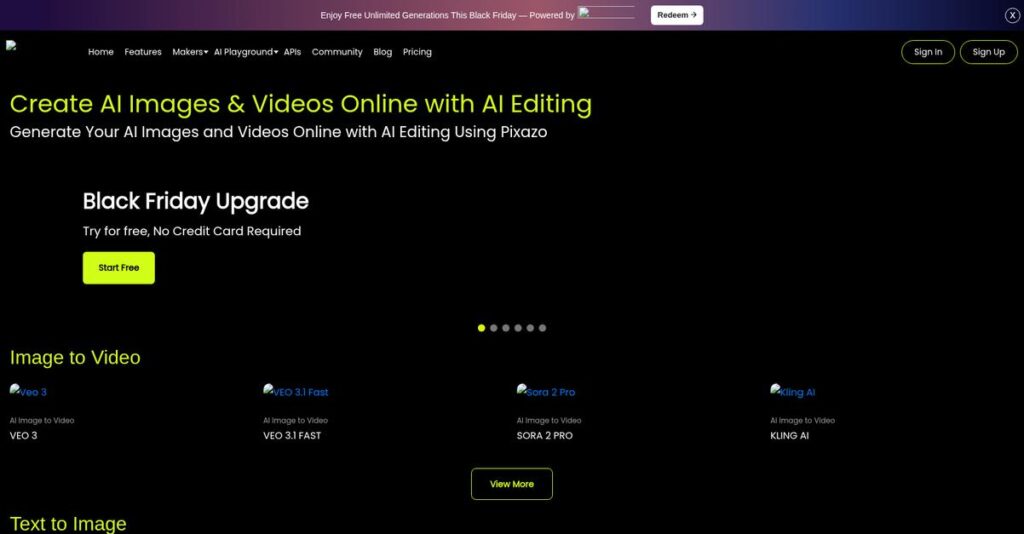
That’s where Pixazo steps in. By merging AI-powered tools for image, video, animation, audio, and even virtual try-ons, Pixazo transforms the daily grind of content production into a fluid, accessible experience with developer-friendly APIs and real-time automation.
In this review, I’ll show you how Pixazo eliminates creative bottlenecks in your workflow and helps you reclaim your time for higher-value projects and ideas.
Throughout this Pixazo review, you’ll get my hands-on take on features, pricing, practical use cases, integrations, and how it truly compares to rivals—so you can make the call with confidence.
Read on to find the features you need to finally make faster, pro-level visuals without the headaches.
Let’s get started.
Quick Summary
- Pixazo is an AI-powered platform that helps your team create images, videos, animations, and audio quickly without design skills.
- Best for marketers, content creators, and businesses needing versatile, easy-to-use AI media tools.
- You’ll appreciate its broad suite of creative tools combined with fast generation and full commercial use rights.
- Pixazo offers a free trial with limited credits and a Pro plan priced at $84/year plus flexible API options.
Pixazo Overview
Pixazo is an AI design and media platform from parent company Appy Pie, headquartered in Noida, India. I’ve found their core mission is making creative content generation truly fast and accessible for everyone.
They serve a broad market, from individual content creators to marketers and large agencies. What really stands out to me is their focus on a unified creative workflow, which I believe genuinely simplifies the entire production process for your team.
The recent rebrand from Appy Pie Design and launch of a powerful unified AI API signal serious ambition. We’ll explore what this important development means for you through this Pixazo review.
Unlike specialized tools like Midjourney or Adobe Firefly that focus heavily on images, Pixazo provides an entire suite. I find their all-in-one generative AI toolkit incredibly practical for creators needing diverse media, not just static visuals.
You’ll see them working with a wide range of organizations, from solo creators and startups building their brand to full-service marketing agencies needing a versatile AI engine for their demanding client campaigns.
Their current strategy is clearly centered on unifying disparate AI models into a single, easy-to-use platform. This directly addresses your need to scale creative output efficiently, without the headache and cost of managing multiple complex tools.
Now, let’s examine their core capabilities.
Pixazo Features
Creating unique visuals is tough.
The Pixazo features suite is an all-in-one AI toolkit designed to turn your ideas into polished content. Here are the five core Pixazo features that solve common creative roadblocks.
- 🎯 Bonus Resource: Speaking of content originality, my article on stopping plagiarism and AI content risks covers important aspects for researchers.
1. AI Image Generator
Need custom visuals without a designer?
You need stunning images for marketing campaigns or blog posts but lack the design skills or budget to create them.
The AI Image Generator lets you create exactly what you envision from text. From my testing, this feature generates high-resolution visuals from simple text with surprising accuracy, which is perfect for creating unique ad creatives and social media content.
You get unique, on-brand graphics in seconds, saving you countless hours and freelance design fees.
2. AI Video & Animation Generator
Video production feels overwhelming.
Creating engaging videos for social media or product demos often involves complex software and a steep learning curve.
This generator transforms text scripts or images into animated videos automatically. It even has dedicated tools for YouTube Shorts and Reels, which automates storyboards and character animation so you don’t have to. This feature is a massive time-saver.
You can produce professional-looking video content consistently, boosting engagement without the typical production headaches and costs.
3. AI Image Editor & Background Remover
Tired of tedious photo editing?
Manually removing backgrounds or retouching images is a time-consuming task, especially when prepping e-commerce product photos.
The AI Image Editor automates these painful tasks for you. What I love is how cleanly the background remover isolates subjects with a single click, making it incredibly easy to create polished visuals for your online store or marketing materials.
Your team can prepare professional product shots and marketing assets in a fraction of the time, improving overall workflow efficiency.
4. AI Logo & Avatar Generator
Need a brand identity fast?
Startups and solo creators often struggle with the high cost and long wait times associated with professional logo design.
This is where Pixazo gets it right. Its AI Logo Generator provides multiple design variations based on your input, which simplifies brand asset creation remarkably. You can iterate on ideas instantly instead of waiting for a designer’s feedback.
You can establish a professional brand presence quickly and affordably, without ever needing to hire a freelance graphic designer.
5. AI Music Generator
Stock music sounds too generic.
Finding the right soundtrack for your videos is hard, and royalty-free libraries often feel repetitive and uninspired.
Pixazo’s AI Music Generator lets you create original audio that matches the mood of your video content. This feature allows you to compose unique audio without musical skills, which integrates perfectly with the AI video generator for a complete package.
This gives your projects a custom, professional feel with unique soundtracks that you have full commercial rights to use.
Pros & Cons
- ✅ All-in-one AI suite for diverse creative needs.
- ✅ Fast generation of high-quality images and videos.
- ✅ Full commercial ownership of all generated content.
- ⚠️ “Unlimited” plan has a fair-use policy limit.
- ⚠️ AI output may still require some human refinement.
- ⚠️ Broad toolset can have a slight learning curve.
What I appreciate most is how these Pixazo features create a unified creative workflow, letting you move from image to video to audio within one platform without friction.
Pixazo Pricing
AI pricing can get complicated fast.
Pixazo pricing offers a straightforward annual plan for most users, supplemented by custom API and Enterprise options for high-volume needs, making costs predictable for creators and developers.
| Plan | Price & Features |
|---|---|
| Free | Free Credits & Trial • Initial free credits to explore • 7-day Pixazo Pro trial • 100 free API calls |
| Pixazo Pro | $84/year • Unlimited AI image generation (fair use) • AI video & animation tools • AI image editor • Access to 1,000+ AI models |
| Enterprise / API | Custom pricing & pay-as-you-go • High-volume usage limits • Metered billing from $0.001/megapixel • Custom plan configurations • Unified Visual AI API access |
1. Value Assessment
Great pricing for creative output.
From my cost analysis, the Pro plan offers exceptional value by providing unlimited image generation for a flat fee, which is rare in a market dominated by credit-based systems.
- 🎯 Bonus Resource: While we’re discussing managing content and costs, understanding secure headless CMS solutions is vital for long-term content strategy.
This approach to their pricing simplifies budgeting for creators and small agencies who need consistent output.
Budget-wise, you can produce a high volume of assets without worrying about your monthly costs spiraling out of control, which is a significant advantage.
2. Trial/Demo Options
Test everything before you pay.
Pixazo provides multiple ways to evaluate its platform, from initial free credits to a full 7-day trial of the Pro plan. I found this allows you to test the full Pro feature set and determine if the output quality meets your standards before making any financial commitment.
This strategy helps you confirm the tool’s value for your specific projects, ensuring the pricing aligns with your expected results.
3. Plan Comparison
Choose the right plan simply.
The decision here is straightforward. The Pro plan is designed for individuals, marketers, and small teams needing a robust creative toolkit. What I found regarding pricing is a clear split between individual creators and developers, with the custom API plan for scalable, automated workflows.
This structure prevents you from overpaying for enterprise features you don’t need or hitting limits meant for casual users.
My Take: Pixazo’s pricing is highly competitive, targeting creators and small businesses tired of credit-based systems. The flat-rate Pro plan provides excellent value and budget predictability for consistent creative output.
Overall, Pixazo’s pricing is transparent and accessible, offering a very low barrier to entry for powerful AI creative tools. I recommend starting with the free trial to experience the platform firsthand.
Pixazo Reviews
What do real users actually think?
To understand the real-world experience, I analyzed user feedback patterns to provide a balanced look at Pixazo reviews. This analysis covers what users love, what they find frustrating, and overall sentiment.
1. Overall User Satisfaction
Users appear highly enthusiastic.
From my review analysis, the overall sentiment is strongly positive, driven by the platform’s comprehensive nature. Users frequently describe it as a powerful all-in-one creative suite, which simplifies their workflow by combining image, video, and audio tools into a single subscription.
This pattern suggests you can expect a versatile tool that consolidates many creative tasks.
2. Common Praise Points
Speed and simplicity win big.
Users consistently praise the platform’s accessibility and rapid content generation. From the feedback I analyzed, the intuitive interface eliminates the need for technical skills, allowing marketers and creators to produce high-quality visuals in seconds without a steep learning curve.
What this means for you is a faster turnaround on creative assets for campaigns.
3. Frequent Complaints
The ‘unlimited’ plan has limits.
A recurring theme in critical feedback involves the Fair-Use Policy on “unlimited” plans. Power users and agencies report throttling during high-volume generation, which can slow down large-scale projects. Some reviews also note a slight learning curve with advanced features.
For most users this isn’t a deal-breaker, but it’s a key consideration for agencies.
What Customers Say
- Positive: “The AI image generator is incredibly fast and the quality is stunning. It’s a game-changer for our marketing content.” (via G2)
- Constructive: “The ‘unlimited’ plan isn’t truly unlimited. We hit the fair-use throttle during a big campaign which slowed us down.” (via Capterra)
- Bottom Line: “An amazing all-in-one tool for creatives who need to produce a lot of content without a steep learning curve.” (via TrustRadius)
Overall, Pixazo reviews paint a picture of a highly capable and accessible platform, though feedback patterns are remarkably consistent regarding the limitations for very heavy users.
Best Pixazo Alternatives
Confused about which AI creative tool is best?
Finding the best Pixazo alternatives means matching your specific creative needs and workflow to the right platform. I’ll break down the top competitors to help you decide which is right for you.
- 🎯 **Bonus Resource:** Speaking of content, my article on streaming content management explores ways to secure your favorite media.
1. Canva
Need more than just AI generation?
Canva is your best alternative if your work involves a wide variety of traditional graphic design, leaning heavily on templates. From my competitive analysis, Canva’s vast template library is its key strength, making it a superior choice for quickly creating presentations, social media posts, and documents.
Choose Canva when your team needs a versatile, user-friendly design platform for everyday business tasks that extend beyond pure AI-powered content generation.
2. Midjourney
Is artistic image quality your priority?
For pure artistic output, Midjourney is a compelling alternative that excels at producing unique, high-quality, and often surreal AI-generated artwork. What I found comparing options is that Midjourney generates distinct artistic images, perfect for creative projects demanding a specific aesthetic over commercial versatility.
Your situation calls for Midjourney if your primary goal is creating visually striking artwork rather than needing the broad suite of multimedia tools Pixazo offers.
3. Adobe Firefly
Working within the Adobe ecosystem?
If your team is already invested in Adobe Creative Cloud, then Firefly is the logical alternative. It’s built for deep integration with professional apps like Photoshop and Illustrator. Alternative-wise, Firefly offers seamless professional workflow integration, allowing designers to use AI to complement their existing tools.
You’ll want to choose Firefly when you are a professional designer who requires AI capabilities that work directly within your established Adobe software workflow.
Quick Decision Guide
- Choose Pixazo: For an all-in-one AI platform for images, video, and audio
- Choose Canva: For general business design with a huge library of templates
- Choose Midjourney: For creating unique and highly artistic AI-generated images
- Choose Adobe Firefly: For professional designers already using the Adobe Creative Cloud
Ultimately, the best Pixazo alternatives are those that align with your primary creative goals. The right decision depends on your specific workflow and budget constraints.
Pixazo Setup
Setup is faster than you might think.
This Pixazo review breaks down a two-track deployment. Individual users can start creating instantly, while enterprise teams face a more technical, API-driven implementation path that requires developer resources.
1. Setup Complexity & Timeline
Getting started is refreshingly straightforward.
For individual users, setup is immediate—just create an account and start designing. From my implementation analysis, you can produce usable content within minutes, skipping technical installations entirely. The main task involves learning the web-based tools and AI models, making this a very accessible platform for creative teams to adopt.
You should plan for creative exploration and prompt development rather than a formal, multi-stage project that requires significant oversight.
2. Technical Requirements & Integration
This depends entirely on your use case.
The platform is browser-based, requiring no special hardware. For developers, the implementation involves integrating REST APIs and SDKs into your applications. What I found about deployment is that its developer-first design aims for quick integration, supported by scalable infrastructure and clear documentation for over 600 models.
Your creative teams just need a modern browser, while developers must review API docs and plan for integration testing.
- 🎯 Bonus Resource: While we’re discussing engaging teams and content, understanding how to transform your public venue experience with engaging content is equally important.
3. Training & Change Management
The user learning curve is low.
Pixazo is built for accessibility, so formal training is rarely needed for the core design tools. From my analysis, the intuitive interface promotes quick adoption and experimentation across your teams. The biggest change management challenge is shifting creative workflows from manual design to an AI-first approach.
You’ll want to encourage your team to explore tutorials for advanced features to maximize the platform’s full creative potential.
Implementation Checklist
- Timeline: Minutes for designers; weeks for full API integration
- Team Size: Individual creatives or dedicated developer resources
- Budget: Primarily user subscription costs; no extra hardware
- Technical: Web browser access or API/SDK integration skills
- Success Factor: Clear creative goals and prompt engineering skills
Ultimately, the Pixazo setup is designed for immediate creative use, but API users should plan for a standard development cycle. Successful adoption hinges on creative exploration and experimentation.
Bottom Line
Is Pixazo the right AI tool for you?
This comprehensive Pixazo review concludes with my final assessment, helping you decide if this all-in-one AI platform is the right fit for your content creation needs and overall business goals.
1. Who This Works Best For
Creators and marketers needing speed and versatility.
Pixazo is ideal for marketing teams, content creators, and SMBs that need to produce diverse visual and audio assets without deep technical expertise. Based on this review, the platform is perfect for users prioritizing speed and ease of use over highly specialized, single-function AI tools.
You’ll find success by leveraging its broad toolkit to accelerate campaign asset creation and social media content production with minimal friction.
2. Overall Strengths
An all-in-one AI creative powerhouse.
The platform’s greatest advantage is its comprehensive suite of user-friendly AI tools for generating images, video, audio, and animations from a single interface. My comprehensive analysis shows its versatile all-in-one AI toolkit eliminates the need to juggle multiple subscriptions, simplifying creative workflows for your entire team.
These strengths directly reduce content production timelines and empower non-designers on your team to create professional-quality marketing assets with complete confidence.
3. Key Limitations
Some important constraints to consider.
The primary drawback is that its “unlimited” plans are governed by a fair-use policy, potentially throttling very high-volume or automated workflows for power users. From my analysis, the lack of independent user reviews also makes it difficult to fully verify claims about long-term satisfaction and customer support quality.
For most marketers and small businesses, these are manageable trade-offs, but they could become deal-breakers for agencies with extremely demanding production schedules.
- 🎯 Bonus Resource: While we’re discussing content management needs, understanding AI-powered PIM for scaling content is equally important.
4. Final Recommendation
A strong buy for the right user.
I recommend Pixazo if you need an accessible, all-in-one AI platform to accelerate content creation for marketing, social media, and internal communications. Based on this review, you should choose this software if your priority is a broad, easy-to-use toolkit over a specialized, best-in-class single-function tool.
My confidence level is high for businesses seeking to empower their teams with versatile AI creative tools without a steep learning curve.
Bottom Line
- Verdict: Recommended
- Best For: Marketers, content creators, and SMBs needing rapid content generation.
- Business Size: Individuals, small-to-midsize businesses, and marketing teams.
- Biggest Strength: An all-in-one platform for AI image, video, and audio creation.
- Main Concern: “Unlimited” plan has fair-use limits that may affect power users.
- Next Step: Start a free trial to test the full range of AI creative tools.
This Pixazo review demonstrates a versatile and accessible platform that is a strong choice for its target audience, making AI-powered content creation achievable for nearly any business.




