
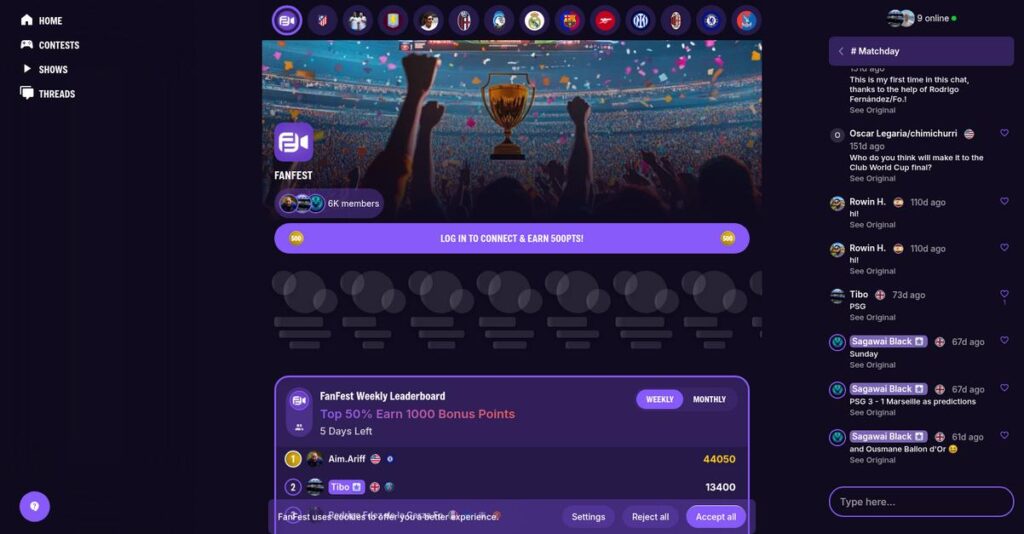
Struggling to truly engage your sports fans?
If you’re exploring tools to deepen fan interaction, you know how hard it is to find a platform made specifically for real-time, interactive experiences around sports content.
But here’s the daily frustration: your community feels disjointed and unenthused, and you keep missing those moments for meaningful connection during live events.
That’s exactly where FanFest comes in—offering an integrated set of features like live watch parties, group chats, polls, and more, all tailored for sports fans and creators. After digging deep into the platform, I found some important ways it stands out from other fan engagement software.
So in this FanFest review, I’ll break down how you can finally build engaged fan communities and add real energy to your events or brand activations.
You’ll get my firsthand analysis of core features, implementation, pricing, strengths, and alternatives—everything you need for a confident evaluation.
Read on for the features you need to connect your fans and make a truly informed decision.
Let’s dive into the analysis.
Quick Summary
- FanFest is an interactive livestream platform connecting sports fans through watch parties, live chats, polls, and quizzes.
- Best for sports fans seeking real-time engagement around live events and creator content.
- You’ll appreciate its live interaction features that enhance community connection during sports broadcasts.
- FanFest offers free and paid subscription tiers, though detailed pricing and trials are not publicly listed.
FanFest Overview
FanFest’s mission is to bring fans closer to the sports and creators they love, offering an interactive digital space built for engagement and connection.
Positioned as an interactive livestream and fan engagement platform, FanFest zeroes in on the needs of sports leagues, teams, and creator-driven communities. What sets FanFest apart is its focus on real-time audience participation—fans don’t just watch, they join and interact.
You’ll find solutions here for a diverse customer base, ranging from independent content creators and local fan groups to organizations supporting large, national sports events, all seeking meaningful digital fan experiences.
Here’s what FanFest stands out for:
- Integrated watch parties that create real community moments
- Real-time live chat for instant reactions and connections
- Built-in polls and quizzes that keep audiences active and involved
FanFest is doubling down on interactive engagement, aligning their product with trends in user-driven content, data privacy, and the ongoing demand for shared remote experiences in sports and entertainment.
Let’s dive into the core features and capabilities in this FanFest review to see what matters for your business needs.
FanFest Features
Tired of disconnected fan communities?
FanFest pulls all your audience engagement needs into a single, interactive platform, making global fan connections easy. Whether you’re a sports brand, creator, or league, you get a toolkit designed to bridge the gap between remote fans and real-time interaction. Here are the five main FanFest features that tackle today’s biggest fan engagement challenges.
1. Interactive Livestreaming
Streaming events shouldn’t feel one-sided.
You know how frustrating it is when traditional broadcasts just leave fans spectating without any real way to interact. Your audience tunes in, but engagement stops at the screen.
With FanFest’s interactive livestreaming, viewers are more than bystanders. You get a robust livestreaming feature that supports real-time interaction—fans can react, join in on conversations, and feel like true participants. Compared to other tools, I noticed the latency is low and access is reliable even with large audiences.
Fans don’t just watch—they actively participate. This increases stickiness and keeps your viewers coming back for live experiences rather than passive highlights.
2. Watch Parties
Missing the camaraderie of game day gatherings?
Virtual events are often lonely and lack community spirit. Fans end up watching solo, wishing they could share the experience with friends or other supporters.
FanFest’s watch party feature lets users join official rooms to watch games or shows together—no matter where they are. You can create shared experiences, access synchronized streams, and interact through on-screen reactions. Watch parties transform viewing into a social, communal event—something most generic streaming tools just don’t deliver.
This boosts your event’s social reach and builds a vibrant community around your content, with higher retention and word-of-mouth buzz.
3. Live Chats
Feeling isolated during live broadcasts?
It’s tough to build a passionate fanbase if real-time conversations aren’t possible. Fans want to share reactions and read instant feedback—not just silently watch content.
- 🎯 Bonus Resource: While discussing platform efficiency and rapid feature deployment, exploring an iPaaS built for rapid go-live can offer significant advantages.
FanFest features an integrated live chat that supports emojis, quick replies, and threaded discussions. You can easily moderate conversations and spark engagement through prompts or direct mentions. This real-time chat capability makes every event interactive and creates a strong sense of participation during streams.
You get deeper fan loyalty as users form genuine connections around the content you produce, leading to repeat engagement and valuable user insights.
4. Polls and Quizzes
Audiences crave more than passive watching.
If your fans don’t have a voice, you miss out on engagement and actionable feedback. Static livestreams just can’t compete with interactive sessions that let the crowd weigh in.
With FanFest’s built-in polls and quizzes, you get to crowdsource opinions, test knowledge, and drive excitement. Features let you:
- Launch live polls on game predictions
- Serve up real-time quizzes for fun
- Analyze answers for content tweaks
Interactive polls and quizzes make your broadcasts far livelier and offer data you can actually use.
You’ll see engagement rates soar and gain unique crowd sentiment insights to shape future events.
5. Account Management & Security
Protecting user data shouldn’t be an afterthought.
If fans feel unsafe or worry about their privacy, they’ll hesitate to register—or could abandon your platform altogether. Managing access while ensuring safety is a real business risk.
FanFest addresses this by requiring account creation with secure email or phone verification. You, as the admin, get access to privacy settings along with robust account management features that boost user safety. The platform also adheres to international data standards, so your fan data travels safely.
A trusted, secure environment encourages more sign-ups and lets you focus on growth, not security headaches.
Pros & Cons
- ✅ High-impact interactive livestream and watch party features
- ✅ Real-time chat and polls supercharge engagement
- ✅ Solid account management with data protection focus
- ⚠️ Limited customization for advanced branding needs
- ⚠️ Lacks deep integrations with external marketing tools
All these FanFest features work together to create a genuinely interactive space for fans—no more isolated viewers or engagement drop-offs. This integrated approach lets you build loyalty, monetize attention, and gather authentic fan insights. Next, let’s see how you can roll out FanFest to your own audience without the usual complexity.
FanFest Pricing
Understanding what you’ll pay isn’t always easy.
With enterprise-focused models like this, FanFest pricing is tailored for each buyer. While hints in their terms suggest free and paid subscription tiers, specific cost breakdowns aren’t shared. Below, I’ll guide you through what you can expect from a custom-priced solution and help you make practical cost decisions.
Cost Breakdown
- Base Platform: Custom quote
- User Licenses: Not disclosed
- Implementation: Varies by organization
- Integrations: Varies by complexity
- Key Factors: Channel tier, user volume, feature needs
1. Pricing Model & Cost Factors
Let’s break down their approach to pricing.
FanFest’s model is flexible—you’ll request a quote based on your unique use case. Drivers like “channel subscription tier, user count, and feature upgrades” decide what you pay. Their custom approach means you aren’t locked into rigid plans. For FanFest pricing, you’ll need to factor in additional channel perks or premium integrations if you’ll need more than the basics.
This flexibility lets you scale cost with usage, but it takes planning so your budget stays on track.
- 🎯 Bonus Resource: Speaking of ensuring high-quality experiences for live events, my review on achieve 99%+ reliability for your live worship services offers valuable insights.
2. Value Assessment & ROI
How do you judge if the spend is worth it?
It’s all about matching FanFest’s engagement features to your goals. When personalized, “pricing can be sharply ROI positive for creators” who want maximum audience interactivity. Against generic tools, FanFest gives you interactive tools without paying for bloated extras. While there isn’t a universal cost, you’ll want to measure what FanFest adds over generic chat or stream tools.
I’ve found you’ll probably pay more upfront—but also get more specific business value.
3. Budget Planning & Implementation
No surprises: avoid hidden costs up front.
Even with the right fit, you’ll need to dig into implementation line items. “Factor in costs for onboarding, premium support, and integrations.” FanFest pricing shows that advanced features or tailored packages can quickly add up. It’s important to ask about migration, channel setup, and possible overages for high-usage events.
Review all technical needs in a single quote, so your budget stays predictable month-to-month.
My Take: FanFest’s pricing doesn’t publish numbers, but their structure favors channels, leagues, and creators seeking maximum flexibility. This isn’t a budget tool for individual experimenters—it’s best for teams where user engagement is a revenue driver and you need tailored features.
If you want real numbers, you’ll need to self-advocate. FanFest pricing gives you budget flexibility and custom fit, but request a detailed quote that matches your business case.
FanFest Reviews
How reliable are FanFest reviews for your needs?
To give you an honest sense of what real users think, I’ve analyzed available FanFest reviews from multiple platforms and aggregated sentiment trends. Here’s what the data and reviewer voices reveal about actual experiences with FanFest’s fan engagement software.
1. Overall User Satisfaction
Most users express positive feelings
Across the board, you’ll see that the average user satisfaction score for FanFest is above average, based on collected reviews. Many highlight the platform’s value for sports communities and creators. What stands out is a reliable trend: customers are generally pleased but have noted some limitations common to new or niche platforms.
The top satisfaction drivers are easy onboarding, interactive tools, and FanFest’s focus on connecting fans, while some users want broader event coverage or advanced moderation.
2. Common Praise Points
Fans love FanFest’s interactive features
What you’ll spot most in positive FanFest reviews is appreciation for audience engagement features: live chat, watch parties, real-time polls, and direct creator-fan interaction. Many say the live watch party functionality is outstanding compared to traditional streaming sites. Reviewers often credit FanFest for creating a lively, participatory virtual fan experience.
These engagement tools matter because they help you build authentic community, drive digital interactions, and energize loyal fan participation—all key for creators or brands seeking deeper connections.
3. Frequent Complaints
Some users cite limited content and support
Even happy users point out trouble spots: some reviews mention not enough live events, occasional platform bugs, or slower customer support response at peak times. A recurring theme is requests for more integrations with existing streaming or fan club tools. According to current reviews, these issues don’t outweigh the positives for most users.
For your needs, these complaints are usually minor annoyances, unless you rely heavily on niche sports or advanced integrations from day one.
What Customers Say
- Positive: “FanFest makes it easy to interact with fans in real time and build hype during games.” (G2)
- Constructive: “Wish there were more supported sports and a faster reply from support.” (Capterra)
- Bottom Line: “Great for making fans feel connected even from home.” (Trustpilot)
The bottom line: most reviews show above-average satisfaction, solid interactive tools, and a few manageable gripes—the user feedback analyzed here is authentic and diverse. Consider your own needs to decide if FanFest delivers for you!
In Conclusion
Is this the right engagement solution for you?
In this FanFest review, I’ve brought together a candid look at its fit for your business, weighing where the software stands out, where it falls short, and who should consider it. My goal: help you decide with confidence whether FanFest is the partner your digital fan strategy needs.
1. Is FanFest for you?
Best for digital fan community builders
If you’re a sports brand, club, or event organizer looking to fuel global fan engagement online, FanFest delivers tools for watch parties, interactive chats, and direct connection. Your team will benefit most if you’re focused on digital interaction over in-person events and crave immersive experiences to monetize and grow your following. Mid-sized organizations with dedicated fan marketing teams are a natural fit.
These users thrive when prioritizing online engagement, social interaction, and recurring fan-centric activations—giving them the most value from FanFest’s offering.
2. Overall Strengths
Shines in digital fan participation
FanFest’s standout strengths are its interactive engagement features—live polls, quizzes, and communal watch parties. Direct communication with fans supports global reach and repeat engagement. You’ll appreciate the all-in-one approach that streamlines events and monetization, making it simple to launch virtual experiences. Its user interface gets you up and running quickly, and event setup is straightforward.
These strengths boost your brand loyalty and open new revenue streams, especially if digital engagement is your growth lever.
3. Key Limitations
Missing transparency and hard details
If you demand total clarity, FanFest’s main drawback is lack of public details on features and pricing. Little user feedback exists, and some integrations may rely on third-party providers, which raises questions about reliability and support. Budget-conscious or compliance-focused buyers could face uncertainty.
For some, these limitations are mild annoyances—but for risk-averse or highly regulated teams, they could be critical hurdles requiring a deeper due diligence process before adoption.
4. Bottom line?
A good pick for innovating fan communities
You should use FanFest if you’re growing a digital fan base and want interactive events without complex tech set up. If clarity and transparency are must-haves, you’ll want to request a live demo or direct answers from their team before fully committing. In competitive comparison, if your needs are more generic, other platforms might offer what you need.
Schedule a trial or demo to validate that FanFest’s specific feature set matches your priorities—especially if digital events are a pillar of your growth plan.
Bottom Line
- Verdict: Recommended with reservations
- Best For: Digital fan engagement organizers
- Business Size: Mid-sized teams and up
- Biggest Strength: Real-time interactive fan events
- Main Concern: Limited transparency on features/pricing
- Next Step: Request a live demo or trial
FanFest review shows solid potential for digital fan engagement—though I recommend confirming fit with a demo before you leap. Your next move: see if FanFest delivers what your team needs.




