
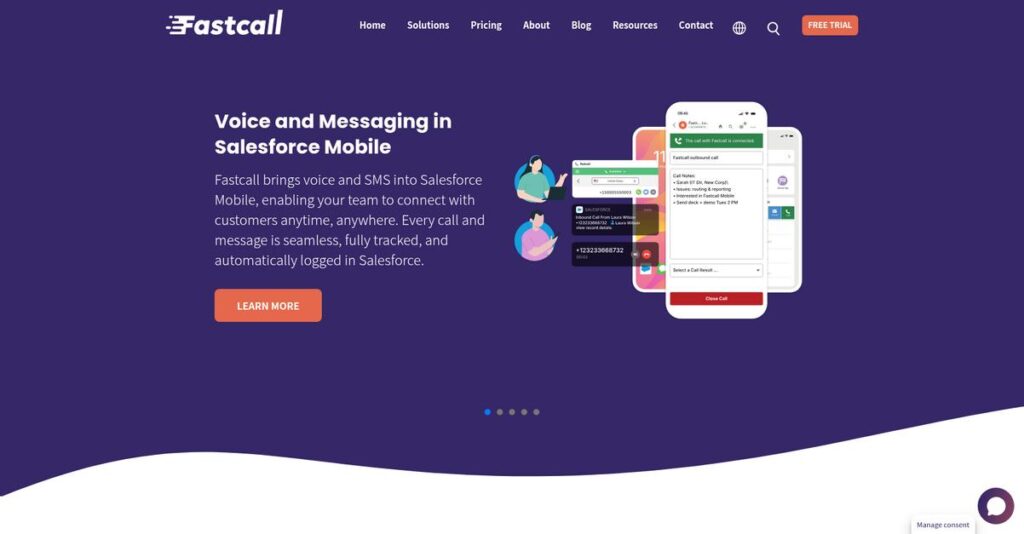
Struggling to connect calls inside Salesforce?
If you’re trying to optimize outreach and keep your customer interactions efficient, the right CTI software decision is make-or-break, especially if Salesforce is your team’s home base.
But let’s be real: you’re tired of clunky integrations eating up your workday and slowing down sales or service results.
That’s why I’ve taken a deep dive into Fastcall—evaluating how their 100% native Salesforce CTI can give you back hours each week, boost call quality, and finally align AI features with what your reps actually need every day.
In this Fastcall review, I’ll break down features, pricing, integrations, and how Fastcall keeps your workflow inside Salesforce so you can move conversations forward faster.
You’ll see exactly how Fastcall handles call routing, reporting, and automation so you can decide if it’s truly a fit for your sales or support team.
You’ll walk away with real answers and the features you need to choose CTI confidently.
Let’s dive into the analysis.
Quick Summary
- Fastcall is a Salesforce-native CTI platform that simplifies calling, messaging, and call logging directly within Salesforce.
- Best for sales and service teams needing tight Salesforce integration for communication management.
- You’ll appreciate its deep Salesforce integration combined with AI-powered call insights and easy click-to-dial features.
- Fastcall offers tiered plans from $30 per user/month with a 7-day free trial and custom options for tailored needs.
Fastcall Overview
Fastcall’s mission is to help businesses save time and strengthen relationships by giving users native, streamlined communication tools right inside Salesforce. Their focus on optimizing the Salesforce platform builds instant credibility for teams already invested in this ecosystem.
When it comes to market positioning, Fastcall targets organizations across sectors like law, healthcare, real estate, and SaaS technology, with a specialization in deeply embedded Salesforce CTI functionality. What sets them apart is their commitment to deep Salesforce integration and continuous innovation, especially around AI-powered insights.
Fastcall is trusted by businesses of all sizes, from nimble startups to established enterprises, particularly those prioritizing sales, customer service, and productivity improvements within Salesforce.
- 🎯 Bonus Resource: While optimizing your tech stack, consider my review of high-fidelity audio over power lines for innovative connectivity.
Here’s where Fastcall stands out:
- 100% native Salesforce architecture for optimal compatibility
- Ongoing product enhancements and Salesforce AI integrations
- Robust support for inbound/outbound calling, SMS, and WhatsApp
With a focus on tailored communication solutions and embracing AI, Fastcall is pushing toward smarter, more flexible workflow automation—perfect for teams seeking streamlined, data-driven engagement.
Let’s dive deeper into the Fastcall review and uncover their core features and capabilities.
Fastcall Features
Missing calls or important touchpoints?
Fastcall is a single solution focused on simplifying Salesforce-native communications by combining voice, messaging, and AI-driven insights directly where your teams already work. Fastcall features are designed to address everyday user frustrations and help you create more efficient, responsive client engagement. Here are the five main Fastcall features that I found most impactful for businesses with Salesforce at the center of their workflow.
1. Inbound & Outbound Calling
Phone outreach feels tedious and disconnected.
Sticking to manual dialing and tracking makes it far too easy to lose track of leads, let calls slip, or waste time with inefficient workflows. Handling both incoming and outgoing calls in Salesforce usually means toggling between apps or tools, which kills productivity.
With Fastcall’s calling feature, you get click-to-dial, dial-by-list, voicemail drop, intelligent routing, and inbound ACD/IVR directly inside Salesforce. All calls are auto-logged and routed intelligently right where your data lives. Your team benefits from a single source of truth, streamlined workflows, and less time lost to repetitive admin.
Expect more lead touches, greater transparency, and better utilization of your sales and service reps.
- 🎯 Bonus Resource: Speaking of optimizing workflows, my guide on global shipping on Salesforce can help streamline your logistics.
2. SMS/MMS & WhatsApp Messaging
Not everyone picks up the phone anymore.
If your reps rely on calls alone, you’re missing chances to connect on your customers’ preferred channels. Without integrated messaging, your outreach can feel scattered, and tracking conversations can get messy.
Fastcall’s messaging feature supports SMS, MMS, WhatsApp, and group chat—all from within Salesforce. Send messages by list, use templates, and log every interaction automatically. You’ll benefit from flexible communication with prospects, and the ability to use three channels:
- SMS/MMS blasts
- Automated WhatsApp
- Group MMS chat
Increased reach means faster responses and richer, multi-threaded customer conversations for your business.
3. Conversational Intelligence (AI-Powered Insights)
Manual call note-taking wastes hours.
Trying to remember details—or transcribe calls after the fact—can leave key insights on the table. Without streamlined AI tools, your team risks missing out on customer sentiment and context for smarter follow-up.
With Fastcall’s conversational intelligence feature (powered by Salesforce Einstein), your calls are automatically transcribed, summarized, and analyzed for sentiment. Insights from each call are surfaced instantly, zero manual effort required. I found this Fastcall feature super helpful for:
- Quickly catching up on past conversations
- Uncovering real customer needs
- Freeing up time for more selling
Your sales reps focus on relationship-building, while AI delivers conversation context.
4. Salesforce Mobile Integration
Office-bound technology isn’t practical anymore.
When your team is out in the field or remote, traditional phone systems and disconnected apps make it hard to stay productive or responsive—with customer info too often out of reach.
Fastcall’s mobile integration extends calls, messages, and Salesforce data to your phone or tablet. No features are stripped back: you work from anywhere while every action logs to Salesforce. You gain flexibility for your team on the road, plus the ability to:
- Place/receive calls
- Message from mobile
- Access key details
You keep moving, while your records never fall behind.
5. Customization & Salesforce Integration
Every business has their own workflows.
When your team can’t adapt communication tools to your sales or support processes, adoption slows, and crucial data gets siloed or lost. Out-of-the-box isn’t always enough.
The customization feature in Fastcall lets you tailor dashboards, commission extra features, or link up with other Salesforce solutions (like Sales Engagement or Einstein Bots). This flexible Fastcall feature means you mold the tool to your exact process. Administrative support and consulting help your setup match your real operations.
You get a solution that grows with your business—not against it.
Pros & Cons
- ✅ 100% native Salesforce voice and messaging features
- ✅ Integrated AI insights speed up call reviews
- ✅ Deep customization to support unique processes
- ⚠️ Limited standalone use outside Salesforce ecosystem
- ⚠️ Occasional learning curve for custom setup
All together, these Fastcall features work in concert—calls, messages, analytics, and custom setups all link directly in Salesforce for a smooth, unified experience. Everything syncs with your pipeline and customer records automatically, so nothing gets lost, even as your process evolves. This lays the foundation for smarter outreach and higher performance.
Fastcall Pricing
How much should you budget for Fastcall?
When it comes to Fastcall pricing, you’ll find published tiers that keep costs straightforward. The vendor offers clear per-user rates for both small teams and large organizations, so you can compare value across plans before any buy-in. Let’s break down what you actually get at each level:
| Plan | Price & Features |
|---|---|
| Essential | $30/user/month (10 user min) • Entry-level Salesforce CTI integration • Basic call controls • Usage fees via Twilio subaccount |
| Pro | $60/user/month (10 user min) • Click-to-dial (desktop & mobile) • Call recording, transcription, & Voice Intelligence • Omni-channel support, simulring, threaded messaging, IVR |
| Custom | Contact Fastcall for quote (10 user min) • Tailored features and integrations • Installation & Salesforce admin services • Custom onboarding & dedicated support |
1. Value Assessment
Simple tiers keep your budget predictable
Fastcall’s pricing delivers value by bundling advanced Salesforce-native features for a per-user monthly cost. Compared to mixing third-party dialers and add-ons, you avoid integration headaches and unexpected fees. Their pricing approach appeals if you want one bill that covers both core calling and sales automation inside Salesforce.
This means your monthly costs stay tightly focused on real usage, and you skip the “hidden extras” that bloat other phone systems.
2. Trial/Demo Options
You can try before you buy
Fastcall offers a 7-day free trial—no strings attached. This lets you test real-world workflows in your own Salesforce instance before any actual pricing commitment. You won’t risk your budget evaluating features head-to-head with other solutions. Just activate the trial from their site to start exploring every feature.
- 🎯 Bonus Resource: While we’re discussing sales optimization, understanding how to create engaging QR codes for your campaigns is equally important.
That makes it easier to understand true fit and ROI before your team commits to a paid plan.
3. Plan Comparison
Choosing the right plan is straightforward
Most businesses start at Pro since it unlocks AI-powered transcription and rich messaging. The Custom tier works best for companies with very strict workflows or compliance needs. The Essential tier fits simple Salesforce CTI deployments and lighter budgets—if you can skip enterprise voice features.
The best fit means your pricing stays optimized for your real usage—not wasted on extras you never use.
My Take: Fastcall’s transparent per-user pricing works perfectly for Salesforce-driven sales teams tired of juggling complex, unpredictable PBX contracts. If your team wants integrated calling, collaboration, and insight—for less than stitching together multiple sales add-ons—you’ll find the Pro tier strongest for ROI.
Pricing here is easy to compare, and you can quickly balance features against spend. The Pro plan packs real value for sales teams.
Fastcall Reviews
What are Fastcall users really saying?
To help you make sense of Fastcall reviews, I’ve analyzed patterns from verified user feedback across top business review platforms. My goal is to break down what real customers think, highlight both strengths and weaknesses, and provide balanced insights you can trust.
1. Overall User Satisfaction
Strong user satisfaction stands out.
Fastcall reviews consistently reflect high satisfaction among users, with many describing the platform as “reliable” and “native feeling.” I’ve found that the majority of reviews praise Fastcall’s seamless fit within Salesforce and its impact on sales productivity. There are regular mentions of both daily reliability and noticeable time savings, showing an above-average sentiment compared to other CTI tools.
What drives this satisfaction? Users repeatedly point to how much easier it is to make calls, log activity, and never leave their Salesforce workflow.
2. Common Praise Points
Deep Salesforce integration gets the most love.
If you dig into recent Fastcall reviews, you’ll find that “native” is the word people use again and again. Users appreciate that there’s no need to leave Salesforce for calling—click-to-dial and integrated call logging get special shoutouts. Responsive customer support from Fastcall’s team also comes up often, with fast answers and attentive listening to feedback making a real difference for users.
For you, this means faster workflows, fewer distractions, and reliable help whenever questions pop up.
3. Frequent Complaints
Stability and costs cause some frustration.
Most complaints I’ve seen in reviews relate to the occasional app crash or glitch, especially if you’re running other Salesforce apps. Users also mention cost concerns: the “product quality is there, but cost is not great.” Still, most frustration is tempered by an overall appreciation for continued feature releases and responsive support, showing that these issues don’t always overshadow satisfaction.
For potential buyers, these complaints mostly appear as manageable annoyances—not major reasons to avoid Fastcall.
What Customers Say
- Positive: “My favorite part about Fastcall is that it is completely native, and I don’t have to go anywhere but Salesforce for my people to start winning.” (G2)
- Constructive: “Cost is not all that great, but product quality is there.” (G2)
- Bottom Line: “Richard and support are always available with ultra fast response time! They always listen for feedback and are constantly releasing upgrades to the system.” (G2)
Based on feedback trends and real user voices, Fastcall earns solid praise for its Salesforce-native calling and support, with manageable drawbacks. The analysis here closely reflects real customer experiences—so you can base your decision on what users actually report.
In Conclusion
Is this the Salesforce dialer for you?
If you’ve been searching for a decisive Fastcall review, here’s my final take and recommendation for your next step. I’ve cut through the product hype to clarify where Fastcall truly excels, who’ll benefit the most, and what trade-offs you need to weigh before rolling it out.
1. Is Fastcall for you?
Best fit for Salesforce-first sales teams
If your business is already powering operations inside Salesforce and you want zero-friction calling and messaging, Fastcall stands out. Sales-driven teams who need native CRM calling with minimal context switching will benefit most, especially mid-sized companies with 10+ sales or service reps working together. The integration depth and AI features make it a smart call center companion for CRM-focused growth.
Teams thrive when they need robust call logging, click-to-dial, and aren’t interested in juggling external CTI tools.
2. Overall Strengths
Deep Salesforce integration is its secret weapon
You get a platform that nails the essentials: native Salesforce CTI with real-time call logging, AI call insights, and reliable multi-channel support (voice, SMS, WhatsApp). Pricing is competitive—especially considering you’ll manage calls, messaging, and analytics from your CRM. Implementation is straightforward if you already live in Salesforce, and users rave about Fastcall’s responsive support.
These strengths help you boost sales velocity and customer service impact right where your team works.
3. Key Limitations
Not ideal for non-Salesforce teams
There are a few trade-offs you should consider. Additional Twilio usage fees can surprise some buyers—be sure to factor in potential costs beyond the Fastcall license. The 10-user minimum for most plans may be too much for solopreneurs or very small teams. A few users report rare crashes, especially when heavy Salesforce customizations are involved.
For most businesses, these drawbacks are manageable if Salesforce is already your main workflow hub.
4. Bottom line?
My recommendation: choose Fastcall if Salesforce is your world
If your core operations run through Salesforce and you want top-notch CTI calling, Fastcall delivers. The all-in-one native CTI design sets it apart for productivity-focused sales or service teams. You won’t find a better-aligned dialer for companies already committed to the Salesforce ecosystem and scaling their contact centers.
Book a demo or start a trial if Salesforce-native is a requirement—my analysis says you can buy with confidence.
Bottom Line
- Verdict: Recommended
- Best For: Native Salesforce-centric sales and service teams
- Business Size: 10+ users, mid-market and above
- Biggest Strength: 100% native Salesforce call management
- Main Concern: Twilio usage fees and minimum seats
- Next Step: Start a free trial or book a demo
In closing, my Fastcall review shows a compelling value for Salesforce-focused teams who need communication power built directly into their CRM. I’m confident in recommending it for the right audience.




