
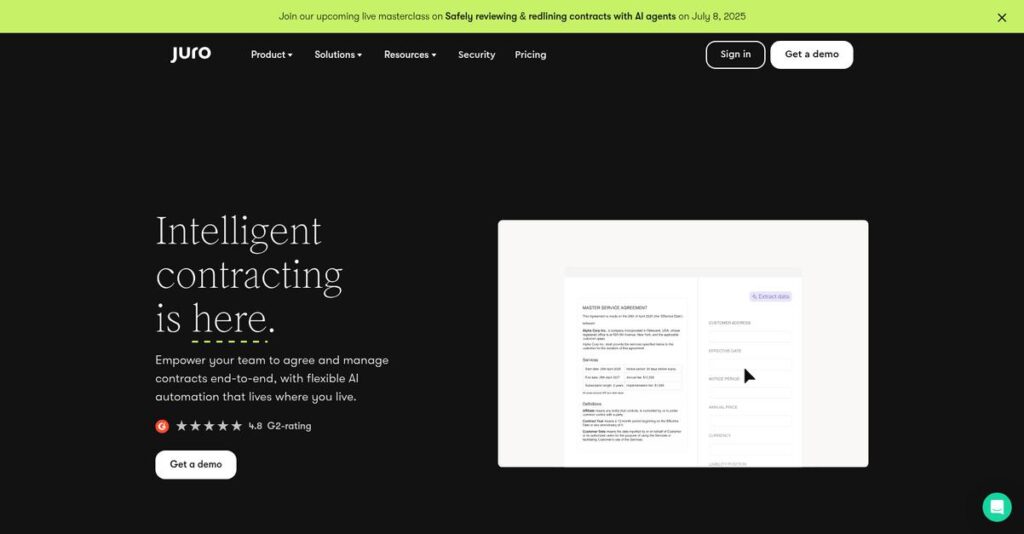
Contract chaos has become a real headache.
If you’re comparing contract management tools, you’re probably dealing with slow manual reviews, scattered document versions, and endless back-and-forth between teams.
The reality is, you’re wasting hours tracking down contract info—and that time crunch means legal and business goals constantly clash.
Juro takes a different route by putting everything from creation to e-signature in one AI-native workspace and adding real-time collaboration, so you actually get contracts over the line faster and with way fewer headaches.
In this review, I’ll show how Juro’s features make contract work genuinely easier for your team at every stage.
You’ll see a breakdown of Juro’s automation, negotiation tools, AI-powered insights, pricing details, and how this stack up against tools like DocuSign CLM and Ironclad—so you can evaluate your options with real context in this Juro review.
You’ll walk away knowing the features you need to choose the right contract platform with total confidence.
Let’s get started.
Quick Summary
- Juro is an AI-native contract automation platform that streamlines contract creation, collaboration, and management in one workspace.
- Best for rapidly scaling businesses needing fast, clear contract workflows and strong legal-business collaboration.
- You’ll appreciate its intuitive interface combined with AI-powered drafting and native e-signature tools to save valuable time.
- Juro offers premium-tier pricing with a free trial but no free plan, requiring annual commitments tailored to user and contract volume.
Juro Overview
Juro has been around since 2016, operating out of London. Their mission is to pull legal and business teams into one cohesive, AI-native contract workspace.
I find they are laser-focused on helping scaling tech businesses that have lean legal teams and cannot afford process delays. What sets them apart is their all-in-one browser-native platform, which simplifies the entire contract lifecycle.
Since their major Series B funding, they’ve invested heavily into their AI Assistant for drafting and analysis. We’ll explore this more deeply through this Juro review.
Unlike more complex enterprise tools that can overwhelm non-legal users, Juro is built for rapid adoption. Their commitment to a truly unified workspace eliminates the painful shuffle between Word, email chains, and separate e-signature providers.
You’ll see them working with fast-scaling organizations in SaaS, marketplaces, and travel—it’s a strong fit for any company managing a high volume of routine agreements.
To me, their overarching strategy is to turn contracts into an active, data-rich asset. By embedding useful AI into an intuitive platform, they help your business unlock critical insights and accelerate revenue cycles.
Now let’s examine their features.
Juro Features
Contract chaos slowing your business?
Juro is an all-in-one contract automation platform designed to end that chaos. The Juro features I tested focus on unifying the entire lifecycle, from creation to signing. Here are five core Juro features that deliver.
1. AI-Powered Contract Automation
Manual contract review is a grind.
Your legal team gets buried in low-value reviews, creating bottlenecks that slow down deals and introduce unnecessary compliance risks.
Juro’s AI Assistant reviews third-party paper against your playbook, right inside Juro or even Microsoft Word. This feature flags risks and suggests redlines with pre-approved language, which is a massive time-saver for legal teams who feel overwhelmed.
This frees up your legal experts to focus on high-value strategic work instead of just checking routine contract clauses.
2. Automated Contract Templates
Tired of drafting from scratch?
Creating contracts manually is slow, inconsistent, and invites errors. This often delays your sales, hiring, and partnership cycles.
From my testing, you can build powerful templates that business users can populate via a simple Q&A workflow. What’s impressive is that this feature empowers self-service contracting, so teams can generate compliant agreements without needing legal’s help every single time.
The result is your sales and HR teams can move faster, generating error-free contracts in minutes, not days.
3. Real-Time Collaboration & Negotiation
Email chains are killing your deals.
- 🎯 Bonus Resource: Speaking of optimizing processes, for professional teams seeking to accelerate coding efficiency, my review of JetBrains offers valuable insights.
Juggling Word documents and endless email threads for negotiation creates version control chaos and frustrating delays for everyone involved.
Juro provides a unified browser-native workspace for redlining, commenting, and negotiating in real-time, all in one place. What I love is how it eliminates version control nightmares, keeping the legal and commercial teams perfectly aligned throughout the entire process.
This gives you a single source of truth for every contract, helping your team close agreements much faster.
4. Native E-Signature
Still paying for another signature tool?
Using separate e-signature tools adds another cost, fragments your workflow, and creates a final hurdle that can delay execution.
Juro includes secure, built-in e-signature capabilities on every plan, which is a huge plus for simplifying your tech stack. This feature lets you sign contracts on any device and automatically generates a secure audit trail without ever leaving Juro.
This removes the final point of friction, helping you get fully executed contracts back in record time.
5. Intelligent Contract Repository
Lost contracts are a huge liability.
Storing agreements in scattered drives makes them impossible to track, leading to missed renewal dates and hidden operational risks.
Juro acts as a smart, searchable repository, turning static documents into live data. Here’s what I found: the automated renewal reminders feature is a lifesaver, ensuring you never miss an important date or an unwanted auto-renewal.
This lets you unlock critical contract data to manage obligations and surface risks proactively across your entire contract portfolio.
Pros & Cons
- ✅ Intuitive interface simplifies contract management for all teams.
- ✅ All-in-one platform saves significant time and costs.
- ✅ Automated workflows empower business users to self-serve contracts.
- ⚠️ Pricing can be a barrier for smaller startups.
- ⚠️ Some users find the signature process cumbersome.
- ⚠️ Limited workflow customization compared to competing tools.
All these Juro features combine to create a truly connected workflow that covers the entire contract lifecycle from start to finish. You get a unified end-to-end contract workspace.
Juro Pricing
Custom pricing isn’t always a bad thing.
Juro pricing uses a custom quote model, which means you receive a plan tailored to your specific contract volume and workflow complexity. This approach avoids generic tiers and focuses on your actual business needs.
- 🎯 Bonus Resource: While discussing your actual business needs, simplifying your business calls and texts is crucial for remote teams.
Cost Breakdown
- Base Platform: Starts from $12,000 – $35,000 per year
- User Licenses: Mid-tier plans average $125/user/month (min. 5 users)
- Implementation: Included with Enterprise plan; custom quote otherwise
- Integrations: Add-ons like Salesforce can cost around $799/month
- Key Factors: User volume, contract volume, AI features, required integrations
1. Pricing Model & Cost Factors
Their pricing is built for growth.
Juro’s subscription pricing is tailored to your operational scale. Your main cost drivers are user count, monthly contract volume, and any selected AI or integration modules you require. From my cost analysis, this approach ensures you only pay for what you use, which is ideal for rapidly scaling businesses.
Budget-wise, this means your investment is precisely allocated to the specific tools that accelerate your entire contracting process, rather than being wasted on a bloated, one-size-fits-all platform that doesn’t fit.
2. Value Assessment & ROI
Justifying this premium investment.
Juro is a premium platform, and its pricing reflects that. The ROI comes from consolidating tools—like e-signature and document storage—and reducing manual legal review time with its AI. For your business, this accelerates the entire sales cycle by removing the common contract bottlenecks that slow down revenue.
What you’re ultimately paying for is speed and efficiency. This directly translates to faster deal closure, increased revenue recognition, and a far more productive and strategic legal team moving forward.
3. Budget Planning & Implementation
Planning your total investment.
Juro’s pricing is typically based on a 12-month plan, so be prepared for an annual commitment. While the Enterprise tier often includes implementation, you should clarify any costs for specific integrations or add-ons. From my research, you must factor in the annual commitment from the very start.
To protect your budget from surprises, I recommend requesting a fully detailed quote that clearly separates recurring platform fees from any potential one-time setup or complex integration costs.
My Take: Juro’s pricing targets scaling businesses that see contracts as a core operational bottleneck. It’s a premium investment for teams that value an all-in-one, AI-powered workspace over cheaper, fragmented tools.
Overall, Juro’s pricing is a strategic investment rather than a simple expense. You’ll get a powerful, unified platform for your money that drives significant efficiency for legal and sales teams.
Juro Reviews
User feedback tells the real story.
To provide a balanced perspective, I analyzed hundreds of Juro reviews from platforms like G2 and Capterra. This deep dive reveals clear patterns in user experience and overall sentiment.
1. Overall User Satisfaction
Users are overwhelmingly positive about Juro.
From my review analysis, Juro holds impressive 4.8+ star ratings across G2 and Capterra. What stands out is a remarkably consistent positive sentiment, with users frequently detailing how the platform exceeded their expectations for contract lifecycle management and simplified team collaboration in their reviews.
This high satisfaction is primarily driven by significant efficiency gains, a genuinely intuitive user interface, and the excellent, responsive customer support users consistently praise.
2. Common Praise Points
Efficiency gains are a consistent theme.
Users repeatedly highlight the intuitive design and all-in-one workspace, which eliminates juggling multiple tools like Word and email. The feedback I analyzed shows users value the massive time savings on contract cycles, reporting tasks that took hours now take mere minutes.
For your team, this means legal and business units can self-serve on routine agreements, drastically reducing bottlenecks and accelerating your time-to-sign metrics.
- 🎯 Bonus Resource: While we’re discussing how to boost productivity, understanding elevating customer experience with AI is equally important for modern teams.
3. Frequent Complaints
Some minor frustrations do emerge.
While overwhelmingly positive, a few common complaints appear in user feedback. The most frequent issue is that pricing can be a barrier for startups and smaller businesses with very tight budgets. Some users also desire more advanced customization options for specific workflows and interfaces.
What you should know is these are rarely deal-breakers. Instead, they represent important considerations for smaller teams or businesses with highly bespoke process requirements.
What Customers Say
- Positive: “Juro has streamlined contract management for our small legal team. It’s clean, user-friendly, and intelligent contracting.” (G2)
- Constructive: “We’ve found the signature process can be cumbersome, requiring extra steps for minor changes once a contract is out for signing.” (Capterra)
- Bottom Line: “What stands out is the efficiency. Work that previously took an hour per contract now takes about 15 minutes.” (G2)
The overall pattern in user feedback is clear: Juro delivers significant value and efficiency. From my analysis, the user feedback appears highly credible and consistent across platforms.
Best Juro Alternatives
Too many contract management options out there.
The best Juro alternatives serve different business needs, from enterprise compliance to sales-focused document automation. From my analysis, your specific priorities will determine the right choice for your company’s contract workflows.
1. Ironclad
For enterprise-level compliance and control.
Ironclad is a heavyweight solution for large organizations needing comprehensive audit trails and granular document management. From my competitive analysis, this alternative provides greater control over contract data, though its power comes with a higher price tag and more complex implementation compared to Juro’s more user-friendly and accessible approach for scaling teams.
You should choose Ironclad when your large enterprise requires robust compliance features and is willing to invest more for deep data control.
- 🎯 Bonus Resource: While we’re discussing various team needs, my analysis of asynchronous collaboration for remote teams might be helpful.
2. PandaDoc
When you need sales document automation.
PandaDoc is a popular choice for sales teams, extending beyond contracts to proposals and quotes with detailed recipient activity tracking. This alternative offers more transparent and flexible pricing plans, including a free trial, making it a more accessible entry point than Juro’s custom quoting model for some businesses.
You’ll want to consider PandaDoc if your primary need is sales document automation and you prefer a straightforward, user-based pricing structure.
3. LinkSquares
For advanced post-signature contract analysis.
LinkSquares shines in its post-signature functionality, using powerful AI for contract analysis, search, and reporting within your existing repository. Based on what I found comparing options, its AI is particularly strong for summarization and extracting key data, making it a powerful alternative for data-driven legal teams.
You should choose LinkSquares if your main priority is unlocking insights from your executed contract database with robust analytics over Juro’s end-to-end creation workflow.
Quick Decision Guide
- Choose Juro: For scaling businesses needing an AI-native, all-in-one contract platform.
- Choose Ironclad:1 For large enterprises requiring heavyweight compliance and granular data control.
- Choose PandaDoc: For sales teams focused on proposals with transparent, affordable pricing.
- Choose LinkSquares: For deep post-signature analysis and unlocking data from existing contracts.
Ultimately, selecting from the best Juro alternatives requires you to evaluate your primary contract needs. Whether you prioritize enterprise control, sales enablement, or post-signature analytics will guide your final decision.
Juro Setup
Juro setup is surprisingly straightforward.
Based on my Juro review research, deployment is refreshingly fast, often taking just weeks. You’re looking at a smooth onboarding process designed for rapid adoption and minimal technical overhead.
Setup Complexity & Timeline
Getting started is quick and efficient.
Most businesses can expect to go live in just a few weeks, a significantly shorter timeframe than typical enterprise software. From my implementation analysis, Juro’s setup is highly structured and guided by their responsive support team, which dramatically accelerates the rollout and prevents common project delays found elsewhere.
To make the most of this speed, you’ll want to prepare your core contract templates and define your main approval workflows in advance of the kickoff.
- 🎯 Bonus Resource: Speaking of streamlining processes, if your team handles creative assets, my article on online proofing solutions offers valuable insights.
Technical Requirements & Integration
No complex infrastructure needed here.
As a cloud-based platform, Juro requires no on-premise servers, removing a major technical hurdle. The primary task during your implementation involves connecting to your core business systems like Salesforce, Slack, or Google Drive. Its native integrations and Zapier connection make this process generally straightforward for your IT team.
Your team will simply need access to the necessary API keys and administrator credentials for any systems you plan to integrate with Juro.
Training & Change Management
User adoption is a key focus.
While the interface is intuitive, users migrating from complex legacy tools may need time to adjust their habits. From my implementation analysis, success hinges on clear communication about process changes and the significant time-saving benefits for your sales, HR, and legal teams. This is a critical part of the implementation.
Plan for dedicated training sessions focused on your new contract workflows to ensure everyone adopts the platform smoothly and confidently.
Support & Success Factors
Vendor support makes a big difference.
Juro’s highly-rated customer support is a major asset during rollout, especially for teams without deep technical resources. What I found is that their responsive customer success managers actively guide you through the entire implementation, helping resolve issues quickly and ensuring you configure the platform’s features effectively.
To leverage this, you should appoint a primary project lead from your team to work directly with Juro’s support for streamlined communication.
Implementation Checklist
- Timeline: 2-3 weeks for standard deployments
- Team Size: Legal/ops lead plus stakeholders from sales and HR
- Budget: Primarily software subscription; minimal professional services needed
- Technical: Integrations with Salesforce, Slack, Google Drive, and others
- Success Factor: Pre-planning contract templates and approval workflows
Ultimately, the Juro setup process is designed for speed and simplicity. A well-defined project scope ensures your team can realize value from the platform almost immediately.
Bottom Line
Juro is a powerful contract automation ally.
- 🎯 Bonus Resource: If you’re also exploring creative software solutions for your team, my article on animation software for creative teams covers a great option.
This final section of my Juro review synthesizes all my findings to give you a clear verdict, helping you decide if this is the right contract automation platform for your business.
1. Who This Works Best For
High-growth companies managing high contract volume.
Juro is ideal for scaling businesses in sectors like SaaS, retail, and real estate that need to empower both legal and commercial teams. From my user analysis, lean legal teams managing high-volume contracts gain the most, as the platform automates routine tasks and reduces administrative burdens significantly, letting them focus on strategic work.
Your success hinges on reducing legal bottlenecks and accelerating deal cycles, enabling your business teams to self-serve on standard agreements with confidence.
2. Overall Strengths
An intuitive, all-in-one contract workspace.
Juro’s primary advantage is its user-friendly, browser-native editor that combines contract creation, collaboration, negotiation, and e-signature into a single flow. Based on this review, its unified AI-native workspace eliminates tool-switching, which users consistently praise for driving team-wide efficiency and faster adoption across all departments involved.
These strengths directly translate into massive time savings, faster time-to-sign, and improved visibility over your entire contract portfolio.
3. Key Limitations
Pricing opacity presents a notable hurdle.
The main drawback is Juro’s lack of transparent pricing, which requires a sales call to get a quote. From my user analysis, the cost can be prohibitive for startups or small businesses with tighter budgets. Additionally, some users report needing more advanced workflow customization options.
For its target market of scaling companies, these are often manageable trade-offs for the value delivered, but they create initial evaluation barriers.
4. Final Recommendation
Juro earns a confident recommendation.
You should choose Juro if your main goal is to accelerate contract cycles and empower business teams with a platform that is easy to adopt. My comprehensive analysis shows that Juro is ideal for organizations prioritizing user adoption and contract velocity over deep workflow customization or the lowest possible cost.
My recommendation is confident: if your priority is streamlining collaboration between legal and commercial teams to close deals faster, Juro is an excellent choice.
Bottom Line
- Verdict: Recommended
- Best For: High-growth companies with lean legal teams and high contract volume.
- Business Size: SMBs, mid-market, and enterprises focused on operational efficiency.
- Biggest Strength: Intuitive all-in-one workspace that drives rapid user adoption.
- Main Concern: Non-transparent pricing may be a hurdle for budget-conscious businesses.
- Next Step: Request a demo to see how it fits your specific workflows.
This Juro review confirms it’s a compelling choice for its target audience, offering a clear path to contract efficiency and speed if your business profile aligns with its strengths.




