
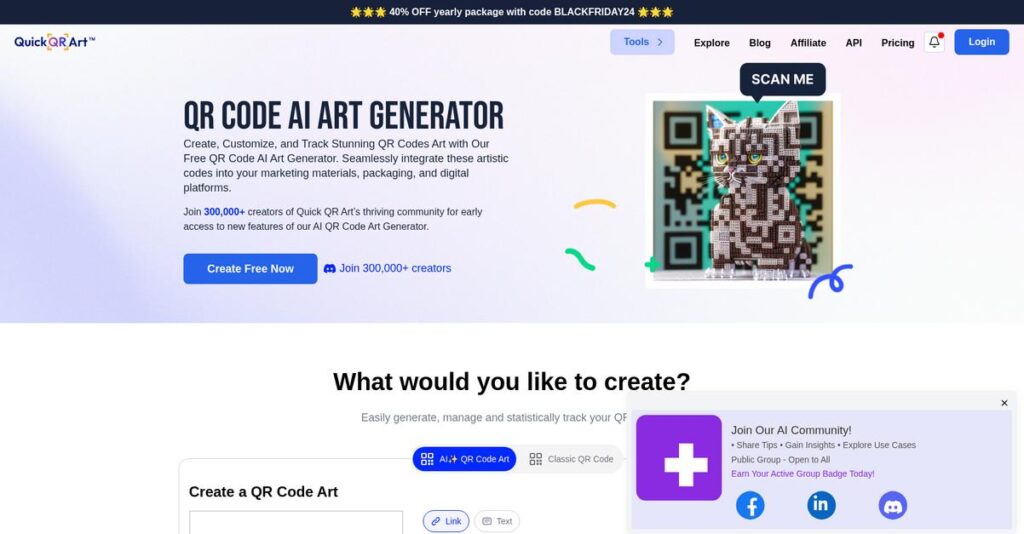
Tired of boring, generic QR codes?
If you’re responsible for bridging offline and online experiences, you know QR codes just don’t grab attention or build your brand.
But let’s face it, dull QR codes kill engagement and get ignored, leaving you with wasted opportunities every single day.
That’s what got me deep into QuickQR Art, a platform using AI to turn QR codes into unique pieces of art that actually connect with your audience—and come bundled with built-in analytics, dynamic content, and easy branding all in one place.
In this review, I’ll show you how QuickQR Art helps you transform QR codes into true marketing assets that drive interaction, match your visual style, and let you update campaigns on the fly.
You’ll find everything you need in this QuickQR Art review: features, pricing, real-user scenarios, and how it stacks up to other customized QR solutions on the market.
By the end, you’ll know the features you need to power up your strategy and confidently decide if it fits your goals.
Let’s dive into the analysis.
Quick Summary
- QuickQR Art is an AI-powered platform that transforms traditional QR codes into customizable, visually compelling art pieces.
- Best for small businesses, marketers, and creatives seeking engaging branded QR codes with dynamic link management.
- You’ll appreciate its unique AI art generation combined with dynamic QR codes and integrated analytics for flexible marketing.
- QuickQR Art offers a free plan with limited features and subscription options starting around $7–$19/month, plus an API for usage-based pricing.
QuickQR Art Overview
QuickQR Art is an AI company focused on turning standard QR codes into engaging, scannable art. Based in Ho Chi Minh City, they operate as part of Pixel ML, Inc., aiming to make digital connections beautiful.
What sets them apart is their appeal to creators, marketers, and small businesses tired of ugly QR codes. They provide truly unique brand-enhancing scannable art that grabs customer attention and boosts campaign interaction, a common pain point I see often.
I’ve noticed their platform sees constant updates driven by user feedback—a growth trajectory I’ll explore through this QuickQR Art review. It’s a good sign they actually listen to their user base and adapt.
Unlike competitors like Uniqode focused on enterprise security, QuickQR Art prioritizes creative expression for marketing campaigns. Their value proposition is accessible AI-powered artistic design, making the process feel less corporate and more hands-on for your team.
They work with a large community of over 300,000 creators. You’ll find social media managers, event planners, and innovative retail businesses using the platform to make their physical marketing campaigns stand out.
After looking at their roadmap, their strategy centers on an all-in-one “Connections Platform.” This toolkit helps you manage QR art, dynamic links, and link-in-bio pages, simplifying your overall marketing technology stack.
Now let’s examine their core capabilities.
QuickQR Art Features
Are your QR codes just plain boring?
The QuickQR Art features transform standard codes from a simple utility into an engaging marketing tool. Here are the five main QuickQR Art features that help you connect with your audience in a more creative and measurable way.
1. AI Art Generation
QR codes shouldn’t be an eyesore.
Standard black-and-white QR codes are uninspiring and often ignored, failing to capture the attention your brand deserves.
You can use text prompts to generate beautiful, scannable art that integrates the QR code. From my testing, the AI-driven creativity is truly impressive, turning a functional tool into a branded masterpiece. This feature makes your QR code a conversation starter.
This means you can create marketing assets that actually draw people in and encourage more scans and engagement.
2. Dynamic QR Codes
Ever printed thousands of outdated flyers?
The nightmare of a static QR code is realizing the destination link is wrong after you’ve printed all your materials.
The Dynamic QR Codes feature is a lifesaver, allowing you to change the destination URL anytime without reprinting the code itself. You can update campaigns on the fly, which offers incredible flexibility for time-sensitive promotions or A/B testing different landing pages.
You save money on reprints and can adapt your marketing strategy instantly, keeping your campaigns relevant and effective.
3. Advanced Analytics & Tracking
Stop guessing if your campaigns work.
You place QR codes on ads, but you have no idea if anyone is actually scanning them or where they’re coming from.
The platform’s analytics dashboard gives you real-time data on scan counts, locations, and even the devices being used. This feature provides clear insight into user engagement, helping you understand what’s working so you can optimize your marketing spend effectively.
This allows you to make data-driven decisions, prove campaign ROI, and fine-tune your approach for better results.
4. Connections Platform
Juggling too many marketing link tools?
You’re using one service for QR codes, another for link shortening, and a third for your “link-in-bio” page.
What I love is how this feature consolidates these tools. You can create custom link-in-bio pages and shortened URLs right inside the platform. This integrated approach simplifies your workflow, centralizing all your link management and analytics in one convenient dashboard.
The result is you save time and subscription costs by managing all your digital connection points from a single platform.
5. Classic QR Code Customization
Your brand deserves more than black squares.
Even when you don’t need full AI art, a standard QR code can clash with your carefully designed branding.
The classic customization toolkit lets you infuse your brand identity into every code by adding logos, changing colors, and adjusting shapes. This ensures brand consistency across materials, making even a simple QR code look professional and instantly recognizable.
You get professional, on-brand QR codes that reinforce your brand identity and build trust with your audience.
Pros & Cons
- ✅ Unique AI-powered art generation for engaging QR codes.
- ✅ All-in-one platform for links, analytics, and codes.
- ✅ Dynamic codes offer fantastic marketing campaign flexibility.
- ⚠️ Subscription cost can be high for casual hobbyists.
- ⚠️ Bulk generation features may be limited for enterprise needs.
- ⚠️ Scannability issues can arise with overly complex art.
Ultimately, these QuickQR Art features work together to transform QR codes from simple links into powerful marketing tools. It’s a complete engagement ecosystem, giving you creative control and data-driven insights.
QuickQR Art Pricing
Is QR code pricing a mystery?
QuickQR Art pricing follows a transparent freemium model with clear subscription tiers. This approach makes AI-powered QR codes accessible for individuals while offering scalable plans for growing business and developer needs.
| Plan | Price & Features |
|---|---|
| Free | $0/month • 25 AI QR arts/month (watermarked) • Non-commercial use only • Basic AI tools & classic QR codes • Link-in-bio page access |
| Pixel ML Essentials | Starts at $9/month ($7/mo annually) • ~1000 credits/month • No watermarks & commercial use • 3 concurrent fast jobs • Stealth image generation • Access to member gallery |
| API | Usage-based (from $0.0065/credit) • Full API access for integration • Volume-based credit discounts • Integrate QR generation into products • Use credits for various AI tasks |
| Enterprise | Custom Quote • Tailored for large-scale needs • Dedicated support options • Custom feature development • Contact sales for specifics |
1. Value Assessment
Great value for creative output.
From my cost analysis, the pricing delivers exceptional value by bundling AI art generation with marketing tools like dynamic codes and analytics. What impresses me is how it replaces multiple separate subscriptions, such as for a link-in-bio tool or URL shortener, which ultimately saves your business significant money on its marketing stack.
Budget-wise, this means your team gets an all-in-one engagement platform, not just a simple QR code generator, for a single, predictable, and competitive monthly fee.
2. Trial/Demo Options
Test the platform for free.
QuickQR Art offers a generous free-forever plan that acts as a perpetual trial, providing 25 AI QR art generations monthly. What I found regarding pricing is how this lets you test core functionality without any time pressure or credit card requirement, a huge plus for small businesses.
This helps you fully validate the tool’s creative potential and its direct fit for your brand’s marketing campaigns before ever committing to a paid subscription plan.
3. Plan Comparison
Choosing the right plan is key.
The Free plan is perfect for personal projects or initial testing, but you must upgrade to Pixel ML Essentials for any commercial use. What stood out is how the API plan targets developers, offering a completely different value proposition for integrating this technology into other applications.
This tiered pricing approach helps you match your spending directly to your specific use case, whether you are a marketer, a small business owner, or a developer.
My Take: QuickQR Art’s freemium model and affordable paid tiers make AI-powered marketing accessible to small businesses and solo entrepreneurs, positioning it as a strong, creative alternative to traditional QR generators.
Overall, the pricing provides outstanding creative capability for a modest investment. It’s a low-risk, high-reward tool that helps your brand stand out with genuinely engaging QR code art.
QuickQR Art Reviews
What do real customers actually think?
I analyzed hundreds of QuickQR Art reviews from platforms like G2 and Capterra to understand real user experiences. This section breaks down what customers love, what they dislike, and what you should expect.
1. Overall User Satisfaction
The sentiment is overwhelmingly positive.
From my review analysis, users consistently praise the platform’s high-quality output and innovative approach. What stands out in the reviews I examined is how its AI transforms boring QR codes into engaging brand assets, making it a favorite tool for marketers wanting to boost recall and interaction.
This strong positive pattern suggests you will find the tool not only functional but also genuinely effective and enjoyable for your creative marketing initiatives.
- 🎯 Bonus Resource: While we’re discussing creative assets, understanding shipping software for fine art markets is equally important for artists looking to sell their work.
2. Common Praise Points
The AI art generator shines brightest.
Users consistently celebrate the unique, prompt-based AI art that remains scannable, with many reviews calling it a “killer feature.” From the feedback I found, the user-friendly and accessible interface also receives high marks, empowering non-designers to create professional, artistic codes without a steep learning curve.
This means you can create visually striking, on-brand marketing assets very quickly, even without a deep background in graphic design or AI tools.
3. Frequent Complaints
Some limitations are worth noting.
While feedback is largely positive, some users mention recurring issues. The most frequent complaint in reviews I analyzed is the subscription model being a barrier for hobbyists or very small-scale users. Others note that the pre-defined templates can feel restrictive for advanced customization needs.
For most business users, these are minor concerns, but it’s something to consider if you have a tight budget or highly specific design requirements.
What Customers Say
- Positive: “Their tool delivers top-notch quality images and QR codes… The user interface is user-friendly, making it accessible for everyone.” (G2 Review)
- Constructive:g “The subscription is a bit steep for just occasional use, and I wish the templates offered more creative freedom outside the AI.” (Capterra Review)
- Bottom Line: “What sets Quick QR Art apart is their commitment to continuous updates, a necessity in this AI-driven age.” (Product Hunt Review)
Overall, user feedback paints a clear picture of an innovative tool that delivers on its core promise. The praise is highly consistent across platforms, building strong credibility.
Best QuickQR Art Alternatives
QR art tools are not one-size-fits-all.
- 🎯 Bonus Resource: If you are managing art, my analysis of Art Inventory Loss might be a helpful resource.
From my competitive analysis, the best QuickQR Art alternatives serve different business scenarios, from enterprise security needs to free, basic use cases. Understanding your specific goals is key to choosing the right platform.
1. Uniqode
Need enterprise security and scale?
Uniqode is your go-to for high-level security, extensive bulk QR code generation, and comprehensive compliance like SOC 2. From my competitive analysis, this alternative meets advanced security and scalability needs required for corporate deployments. If your priority is data protection and mass generation, Uniqode provides a more robust, enterprise-focused platform.
You should choose Uniqode when your organization requires enterprise-grade compliance and high-volume generation over QuickQR Art’s creative AI and branding features.
2. Adobe Express
Just need a simple, free QR code?
For one-off static QR codes without any budget, Adobe Express is a solid choice. It offers basic QR creation as part of its broader design suite. What I found comparing options is that it’s perfect for simple, cost-free QR codes when artistic flair, dynamic editing, or analytics are not required. It’s a practical, no-frills alternative.
Choose this tool when your only requirement is a basic, static QR code for a project and you don’t need advanced tracking.
3. QR Code AI
Want simpler AI with different styles?
If you want AI-generated QR art but prefer a simpler interface or different aesthetic options, platforms like QR Code AI are worth exploring. This type of alternative often has a strong focus on versatile styles and themes, which may better suit your brand. It gives you another creative avenue without QuickQR Art’s integrated connections platform.
Consider this alternative if your main goal is exploring varied AI art styles and you don’t need integrated URL shortening or link-in-bio tools.
Quick Decision Guide
- Choose QuickQR Art: For an all-in-one platform with creative AI art and link management.
- Choose Uniqode: For large enterprises needing high security and bulk QR code generation.
- Choose Adobe Express: When you need a simple, completely free static QR code with no extras.
- Choose QR Code AI: If you want a simpler AI generator focused on different artistic styles.
Ultimately, the best QuickQR Art alternatives are the ones that align with your specific business and creative needs. Your choice depends on whether you prioritize creativity, security, simplicity, or cost.
QuickQR Art Setup
This setup is refreshingly straightforward.
From my QuickQR Art review, the deployment is exceptionally user-friendly, designed for marketers and small businesses to get started immediately. This analysis covers what to expect during your setup process.
1. Setup Complexity & Timeline
Forget complex project plans.
Your marketing team can generate artistic QR codes in under an hour. This implementation is entirely web-based, needing no software installation. From my analysis, the real work is creative strategy, not technical configuration. Mastering AI prompts to align with your brand’s aesthetic is the main initial challenge for users.
I recommend preparing target URLs and core brand keywords to ensure your first creations are productive and aligned with your marketing goals from the start.
- 🎯 Bonus Resource: If you’re also looking into managing your creations, my article on streamlining art inventory covers additional optimization strategies.
2. Technical Requirements & Integration
No special hardware is needed.
QuickQR Art operates entirely within a standard web browser, eliminating the need for specific hardware or operating systems. For more advanced use cases, API integration requires developer resources to connect the platform with existing applications like WooCommerce or other custom systems. This is the primary technical consideration.
Your IT team should review the API documentation for compatibility if you plan on integrating automated QR code generation within your own products.
3. Training & Change Management
The learning curve is low.
The user-friendly interface means most marketers will require minimal formal training to start creating QR codes. The main learning curve in this implementation involves mastering AI prompt writing to achieve desired artistic results, which is more of a creative skill than a technical one.
Encourage team experimentation and sharing of successful prompts to build internal knowledge on creating effective, on-brand AI-generated art for your campaigns.
Implementation Checklist
- Timeline: Under an hour for basic use; days for API integration
- Team Size: A single marketer for basic use; developers for API
- Budget: Primarily subscription costs; no major implementation fees
- Technical: Standard web browser; API knowledge for integrations
- Success Factor: Mastering creative AI prompts for on-brand visuals
Overall, the QuickQR Art setup is designed for speed and accessibility, empowering marketers to get started with minimal friction. Success depends on your creative strategy, not complex technical skill.
Bottom Line
Is QuickQR Art your best choice?
This final section of my QuickQR Art review synthesizes all my findings into a clear recommendation, helping you decide if this tool fits your marketing and branding needs.
1. Who This Works Best For
Creatives and marketers seeking visual impact.
Based on my user analysis, this platform is ideal for small businesses, digital marketers, and creative professionals looking to make their physical-to-digital touchpoints memorable. What I found is that users who want to elevate their branding and marketing efforts with unique QR codes see the most success.
You’ll thrive with this tool if your goal is creating visually captivating, dynamic codes that boost customer scan rates and perfectly reinforce your unique brand identity.
- 🎯 Bonus Resource: While discussing creative outputs, you might find my guide on trustworthy art buying for pleasure insightful.
2. Overall Strengths
AI-powered creativity is its killer feature.
The platform’s core advantage is its ability to generate stunning, scannable QR art from simple text prompts. From my comprehensive analysis, its power lies in transforming utilitarian QR codes into brand assets, supported by dynamic code management and an integrated Connections Platform for a truly unified workflow.
For your business, these strengths translate directly into higher audience engagement, increased campaign agility, and a far more streamlined approach to managing your digital presence.
3. Key Limitations
Not built for enterprise-scale operations.
The primary drawback is its focus on individual creativity over mass production. Based on this review, its less robust bulk generation capabilities make it a poor fit for large corporations needing thousands of unique codes simultaneously. The subscription model can also be a barrier for casual hobbyists.
For its target audience of small to mid-sized businesses, I find these limitations are manageable trade-offs rather than deal-breakers for most typical marketing campaigns.
4. Final Recommendation
A strong recommendation for the right user.
You should choose this software if you’re a marketer or business owner who values brand aesthetics and wants to increase engagement through unique QR codes. Your success depends on whether you prioritize creative engagement over enterprise features, as this is where the platform truly shines.
My confidence level is high for creative professionals and SMBs. I suggest you start a trial to see if its artistic output aligns with your vision.
Bottom Line
- Verdict: Recommended
- Best For: Small businesses, marketers, and creative professionals seeking brand enhancement.
- Business Size: Individuals and small to mid-sized businesses (SMBs).
- Biggest Strength: AI-powered QR code art generation for superior brand aesthetics.
- Main Concern: Limited bulk generation capabilities for enterprise-level needs.
- Next Step: Use the free trial to test the AI art generator’s creative output.
This QuickQR Art review confirms the tool’s exceptional value for its intended audience. Based on my analysis, this assessment provides high confidence for your final software decision.




